Facebook
 Twitter
evansandreid
New Pleskian
- Server operating system version
- Plesk Obsidian AlmaLinux 9.7 (Moss Jungle Cat)
- Plesk version and microupdate number
- 18.0.75_build1800260102.11 os_RedHat el9
Having issues with high CPU usage on our server
running 2 WooCommerce sites for a few years with no issues, only way to reduce the CPU usage is to suspended the sites.
Have turned plugins off 1 by 1 but nothing changes enough to pin point what is causing the high usage.
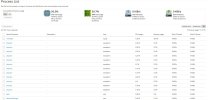
In the process list one site list more processes than the other.
how can I work out what theses processes are liked to? I can see they all have unique PID numbers, but do not know where to look.
The screenshot percentage is with WooCommerce plugin deleted from both sites.
Any help would be greatly appreciated
running 2 WooCommerce sites for a few years with no issues, only way to reduce the CPU usage is to suspended the sites.
Have turned plugins off 1 by 1 but nothing changes enough to pin point what is causing the high usage.
In the process list one site list more processes than the other.
how can I work out what theses processes are liked to? I can see they all have unique PID numbers, but do not know where to look.
The screenshot percentage is with WooCommerce plugin deleted from both sites.
Any help would be greatly appreciated