Facebook
 Twitter
R
RaimundoA
Guest
Dear Sir,
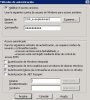
We want to create a plesk domain called "exampledomain.com" and plesk automated process creates with anonymous account IUSR_exampledomain as showed in attached capture "anonymous_access_configuration_created_by_plesk.JPG".
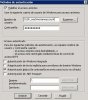
We need to change anonymous access configuration for this particular domain to the general IUSR_machinenameaccount as showed in attached capture "anonymous_access_configuration_manually_modified.JPG".
After changing it in IIS Manager everything works well for a period of time (hours) and then domain returns to initial anonymous configuration made by plesk.
We have seen that there is a command called "websrvmng.exe --update-anon-password-all" that perhaps plesk system execute periodically and makes config returns to initial state losing manual changes.
Is there a way to configure anonymous access for a plesk IIS domain making changes permanent? We also have seen a command called "websrvmng.exe --configure-anonymous-access" but didn't found any documentation about syntax or if it's really made to acomplish this task.
Looking for your help, many thanks in advance.
Raimon
We want to create a plesk domain called "exampledomain.com" and plesk automated process creates with anonymous account IUSR_exampledomain as showed in attached capture "anonymous_access_configuration_created_by_plesk.JPG".
We need to change anonymous access configuration for this particular domain to the general IUSR_machinenameaccount as showed in attached capture "anonymous_access_configuration_manually_modified.JPG".
After changing it in IIS Manager everything works well for a period of time (hours) and then domain returns to initial anonymous configuration made by plesk.
We have seen that there is a command called "websrvmng.exe --update-anon-password-all" that perhaps plesk system execute periodically and makes config returns to initial state losing manual changes.
Is there a way to configure anonymous access for a plesk IIS domain making changes permanent? We also have seen a command called "websrvmng.exe --configure-anonymous-access" but didn't found any documentation about syntax or if it's really made to acomplish this task.
Looking for your help, many thanks in advance.
Raimon