• The new Python extension is now available. It allows customers to deploy and manage WSGI-based Python applications on their websites directly from Plesk.
  • The Plesk Mobile apps for iOS and Android and the Plesk Mobile Center extension have been deprecated, and are no longer available for new installations. In Plesk Obsidian 18.0.84, the Plesk Mobile Center extension will be removed from servers during the upgrade, and the Plesk Mobile apps will lose their server management features.
  • The Social Login extension has been deprecated and will be removed in Plesk Obsidian 18.0.84. After that, it will no longer be possible to log in to Plesk with a Google, Facebook, GitHub account, or with a passkey. Plesk usernames and passwords, as well as logging in with a WebPros Account, are not affected.

Question How to Delete PHP FPM Error Logs?

harisn

New Pleskian
Hello everyone!

My /var/log/plesk-php74-fpm directory is a whopping 29GB in size. How can remove these logs from the server?
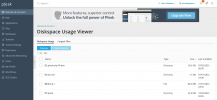
Screenshot 2021-02-10 at 3.24.09 AM.png

Is it completely safe for me to directly delete them from this page?

I only use this server for a small WordPress blog. Any help would be greatly appreciated.

Thanks,
Haris
 
Are there really THAT many accesses to a "small WordPress blog"? Anyway, I'm pretty sure that there is a standard rotation job, once a week? But if you are running a "small" blog, then it's possible that a major proportion of the space usage is due to the error log(s) - I recommend to check that out, maybe you need to fix any plugins / plugin conflicts leading to error messages...
 
Yep, the error logs should be empty (only notices of daemon restarts). If they aren't, something else needs to be fixed.
 
Back
Top