
 Facebook
 Twitter

AlexLaforge
New Pleskian
- Server operating system version
- Windows Server 2019
- Plesk version and microupdate number
- 18.0.64
Each day comes with its own New [new] (new) Promo of SiteJet inside Plesk ! 
In Plesk Obsidian 18.0.64, the "SiteJet" Promo is now appearing under the "Get Started" Tab with the title "Create a website or application on this domain".
How can we hide it ?
We tried this so far :
It's annoying to have so many panel.ini parameters to get rid of these... SiteJet promos are like a cat-n-mouse game like blocking Ads or Spam.
This type of behaviour from Plesk, especially regarding the price of licenses is stunning.
Thanks for your assistance !
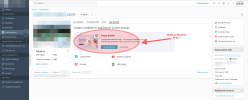
In Plesk Obsidian 18.0.64, the "SiteJet" Promo is now appearing under the "Get Started" Tab with the title "Create a website or application on this domain".
How can we hide it ?
We tried this so far :
Code:
[ext-notifier]
    sitejetPromo = false

[ext-plesk-sitejet]
    enableOnSiteApplicationWizard = true

[extPleskSitejet]
    enablePromoBanner = false
It's annoying to have so many panel.ini parameters to get rid of these... SiteJet promos are like a cat-n-mouse game like blocking Ads or Spam.
This type of behaviour from Plesk, especially regarding the price of licenses is stunning.
Thanks for your assistance !

