Facebook
 Twitter
Hello,
I expored my databse fom my old hoster and want to import it to my new Windows Server 2012 r2 vps Server but I can't find that option:
I found this link:
https://manage.grabweb.net/knowledgebase.php?action=displayarticle&id=459
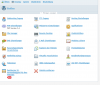
my dashboard looks like this, it is missing the Backup Manager: Image: "dashboard.png"
Any Idea on how to solve this?
Thanks
René!
I expored my databse fom my old hoster and want to import it to my new Windows Server 2012 r2 vps Server but I can't find that option:
I found this link:
https://manage.grabweb.net/knowledgebase.php?action=displayarticle&id=459
my dashboard looks like this, it is missing the Backup Manager: Image: "dashboard.png"
Any Idea on how to solve this?
Thanks
René!