Follow along with the video below to see how to install our site as a web app on your home screen.
Note: This feature may not be available in some browsers.
The new Python extension is now available. It allows customers to deploy and manage WSGI-based Python applications on their websites directly from Plesk.
Debian 11 has reached its end-of-life (vendor EOL date - August 31, 2026). Plesk Obsidian 18.0.81 is the last release to support it.
If you are running Plesk Obsidian on Debian 11, we recommend you upgrade those servers to Debian 12 using our dist-upgrade tool.
We plan to deprecate and remove the support for XML RPC protocol versions earlier than 1.6.9.1 in Plesk Obsidian 18.0.82. We strongly recommend that you update all existing integrations using earlier versions of the XML RPC protocol to comply with the version 1.6.9.1 specification.
I had go thru the article and i would like to confirm a few questions:
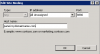
1) Refer to the attached image, , i would like to know can i access to Plesk panel using http://panel.mydomainname.com or not.
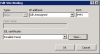
2) Refer to the attached image, , i cannot edit the hostname. Then, how to access the Plesk control panel url without the port number?
3) "Note: Default bindings will be restored if the Plesk installation is repaired with Plesk Reconfigurator (Plesk Reconfigurator → Repair Plesk Installation → Select Plesk Services and click Check)." Where to get the Plesk Reconfigurator?
I had go thru the article and found this article was on How to change the port for the Plesk Control Panel interface. But what i want to know is how to remove the port number 8443 or 8880 in Plesk control panel URL.

 Facebook
 Twitter