
 Facebook
 Twitter
M
MihaiR
Guest
Hi all,
I'am beginer and i buy a dedicated server with plesk panel but i don't know to setup the DNS Zone,i read the documentation of plesk panel but honestly i don't understand verry much,so i'am here to request some help.
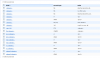
How to fill these areas from Attached Thumbnails ?
My details :
Ip server adress : 78.46.78.41
My domain : videosarea.com
and this i recived from my host :
The IPv4 adresses of our recursive DNS servers are:
213.133.98.98
213.133.99.99
213.133.100.100
can anyone please help me step by step ? thx
Mike
I'am beginer and i buy a dedicated server with plesk panel but i don't know to setup the DNS Zone,i read the documentation of plesk panel but honestly i don't understand verry much,so i'am here to request some help.
How to fill these areas from Attached Thumbnails ?
My details :
Ip server adress : 78.46.78.41
My domain : videosarea.com
and this i recived from my host :
The IPv4 adresses of our recursive DNS servers are:
213.133.98.98
213.133.99.99
213.133.100.100
can anyone please help me step by step ? thx
Mike
Attachments
Last edited by a moderator:


