Facebook
 Twitter
Faris
New Pleskian
Hi, I am unable to change the password of user faris_aga with plesk 12 which we use in virtual server.
If the error is ...:
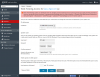
Error: The following system user attributes were not changed: passwd (Unable to execute usermng: Empty input path: (87) The parameter is incorrect. at execute console command --set-password(vconsoleapp::start line 100) at execute "C:\Program Files (x86)\Parallels\Plesk\admin\bin\usermng.exe" --set-password "--name=faris_aga" "--password=*"(vconsoleapp::run line 117) (Error code 1))
Note: User is (faris_aga) not admin.
If the error is ...:
Error: The following system user attributes were not changed: passwd (Unable to execute usermng: Empty input path: (87) The parameter is incorrect. at execute console command --set-password(vconsoleapp::start line 100) at execute "C:\Program Files (x86)\Parallels\Plesk\admin\bin\usermng.exe" --set-password "--name=faris_aga" "--password=*"(vconsoleapp::run line 117) (Error code 1))
Note: User is (faris_aga) not admin.