
 Facebook
 Twitter
UnitedGamers
New Pleskian
Hey, by mistake i removed a plesk admin panel website in the "Information Internet Services (IIS) Manager" and now i am not able to connect with Plesk Panel Admin
I remember, that i had two bindings there, 1 was with http ip and port 8443 and the other had https ip and port 8880 Was trying to add it with many configuratiosn, but while adding the website i don't know what to put there
Whats the physical path and aplication pool? Could someone look at his configuration and tell me how to fill the empty places at the atached graphic?
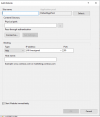
I remember, that i had two bindings there, 1 was with http ip and port 8443 and the other had https ip and port 8880 Was trying to add it with many configuratiosn, but while adding the website i don't know what to put there
Whats the physical path and aplication pool? Could someone look at his configuration and tell me how to fill the empty places at the atached graphic?


