• The APS Catalog has been deprecated and removed from all Plesk Obsidian versions.
    Applications already installed from the APS Catalog will continue working. However, Plesk will no longer provide support for APS applications.
  • Please be aware: with the Plesk Obsidian 18.0.78 release, the support for the ngx_pagespeed.so module will be deprecated and removed from the sw-nginx package.

Issue imagick installed but no Imagemagick

Cbeam

New Pleskian
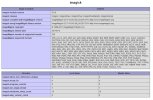
A php-info page return imagick but Imagemagick itself is not installed.

root@s1 / # convert -version
-bash: convert: command not found

Did plesk remove Imagemagick automatically or did it get installed in a private directory? How can I find out?
 
root@s1 / # convert -version
-bash: convert: command not found
What about installing a related package with the OS package manager?
For Ubuntu/Debian:

# apt-get install imagemagick

For CentOS:

# yum install ImageMagick
 
Sorry I'm trying to get webp running with imagick but it's not working.

From the attachment notice there is no webp in ImageMagick supported format. What are the way I can do to add webp support?
 

Attachments

  • chrome_ZZZ0UybzGS.jpg
    chrome_ZZZ0UybzGS.jpg
    392.5 KB · Views: 11
The problem seem to be plesk-php74-imagick is compiled from ImageMagick 6.9.7-4 without webp support. Can plesk recompiled this with webp format support and update their repository?
 
Back
Top