Facebook
 Twitter
- Server operating system version
- Ubuntu 20.04
- Plesk version and microupdate number
- Obsidian 18.0.51
Hi,
I got an instance with Amazon Lightsail (Ubuntu) running with Plesk.
My domain is managed through Amazon Route 53.
I changed the URL of plesk by plesk.mydomain.com
I created a record (A) in Route 53 to link subdomain plesk.mydomain.com with my IP address used by Plesk.
I installed let's encrypt ssl certificate to this subdomain plesk.mydomain.com
If I check DNS plesk.mydomain.com I can see that linked has been done correctly with DNS propagation checker.
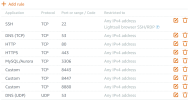
I opened port 8443 in my Lightsail instance in any case.
Problem that I have now, is that I can't connect to my Plesk login page using https://plesk.mydomain.com, I'm getting a timeout issue.
If I try the link https://plesk.mydomain.com:8443 I'm getting error "ERR_ADDRESS_UNREACHABLE"
If I try to connect to Plesk with my IP address using 8443, it's not working anymore...
So to resume, I don't know how to retrieve my access to Plesk....
Could someone give me some help?
I got an instance with Amazon Lightsail (Ubuntu) running with Plesk.
My domain is managed through Amazon Route 53.
I changed the URL of plesk by plesk.mydomain.com
I created a record (A) in Route 53 to link subdomain plesk.mydomain.com with my IP address used by Plesk.
I installed let's encrypt ssl certificate to this subdomain plesk.mydomain.com
If I check DNS plesk.mydomain.com I can see that linked has been done correctly with DNS propagation checker.
I opened port 8443 in my Lightsail instance in any case.
Problem that I have now, is that I can't connect to my Plesk login page using https://plesk.mydomain.com, I'm getting a timeout issue.
If I try the link https://plesk.mydomain.com:8443 I'm getting error "ERR_ADDRESS_UNREACHABLE"
If I try to connect to Plesk with my IP address using 8443, it's not working anymore...
So to resume, I don't know how to retrieve my access to Plesk....
Could someone give me some help?