• Debian 11 is approaching its end-of-life (vendor EOL date - August 31, 2026). Plesk Obsidian 18.0.80 will be the last release to support it.
    If you are running Plesk Obsidian on Debian 11, we recommend you upgrade those servers to Debian 12 using our dist-upgrade tool.
  • We plan to deprecate and remove the support for XML RPC protocol versions earlier than 1.6.9.1 in Plesk Obsidian 18.0.82. We strongly recommend that you update all existing integrations using earlier versions of the XML RPC protocol to comply with the version 1.6.9.1 specification.

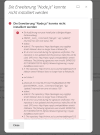
Issue Install Nodejs failed

max2334

New Pleskian
Server operating system version
Debian 4.9
Plesk version and microupdate number
plesk obsidian 18.0.44
Hi everyone,

i tried to install the nodejs extension but its failed. NodeJS support is enable on my server. How can I can install or use nodejs script on my server?Bildschirmfoto 2022-08-16 um 10.02.26.png
 
The problem is with third-party repositories mentioned in the error message. Try to remove or disable, at least, them.
 
Hi,
but i can not disable mariadb since i have only installed mariadb on my server. so how can i resololve this issue?
 
To fix errors with mysql repository like:
W: An error occurred during the signature verification. The repository is not updated and the previous index files will be used. GPG error: Index of /232905/apt/debian stretch InRelease: The following signatures were invalid: EXPKEYSIG 8C718D3B5072E1F5 MySQL Release Engineering <[email protected]>
run command:

# apt-key adv --keyserver pgp.mit.edu --recv-keys 5072E1F5
 
root@ ~ # apt-key adv --keyserver pgp.mit.edu --recv-keys 5072E1F5
Executing: /tmp/apt-key-gpghome.3ppXYcUjEQ/gpg.1.sh --keyserver pgp.mit.edu --recv-keys 5072E1F5
gpg: keyserver receive failed: No data
root@ ~ #

bekomme diese fehler hier..
 
Back
Top