• The new Python extension is now available. It allows customers to deploy and manage WSGI-based Python applications on their websites directly from Plesk.
  • The Plesk Mobile apps for iOS and Android and the Plesk Mobile Center extension have been deprecated, and are no longer available for new installations. In Plesk Obsidian 18.0.84, the Plesk Mobile Center extension will be removed from servers during the upgrade, and the Plesk Mobile apps will lose their server management features.
  • The Social Login extension has been deprecated and will be removed in Plesk Obsidian 18.0.84. After that, it will no longer be possible to log in to Plesk with a Google, Facebook, GitHub account, or with a passkey. Plesk usernames and passwords, as well as logging in with a WebPros Account, are not affected.

Issue Invalid argument not valid semver ('' received)

Dmytro

Regular Pleskian
Server operating system version
CloudLinux 8.10
Plesk version and microupdate number
Plesk Obsidian 18.0.77 #2
Hi. Newly installed account from WHMCS (with wordpress auto installation feature).
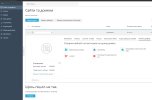
Before wordpress actually installed if I login into Plesk I see :

plesker1.jpg

Same error if WordPress deleted manually and not detached in WPToolkit
 
Is there any update on what's causing this problem? I've got that as well, plesk
WP Toolkit - 6.10.1-10323
Plesk - Obsidian 18.0.77 Update #2 (Web Host Edition)
 
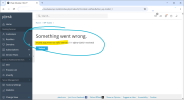
I got the same type of error message on the WP Toolkit:
Code:
Invalid argument not valid ('7.1-alpha-62492' received)

WP Toolkit version: 6.10.1-10323
Plesk Obsidian 18.0.77 Update #5 (Web Host Edition)

How to trigger the error​

- Expanding the row of the WordPress site
- Navigating with the pagination to another page containing the WordPress site

Plesk - WP Toolkit - Error - Invalid argument not valid ('7.1-alpha-62492' received).png

Plesk Panel Log​

I typed the error message into Google and switched to AI Mode which recommend to check the logs to find and fix the offending WordPress site with the command:
Code:
tail -n 100 /var/log/plesk/panel.log

Plesk - Logs - WP Toolkit List.png

Non-SemVer version numbers​

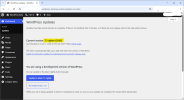
The list entry with the name WordPress Beta and the specific version number 7.1-alpha-62492 is a clear indicator that the WP Toolkit has an issue with non-semver version numbers.

WordPress​

The WordPress admin is unaffeced and still be used.

WordPress - Updates - Version 7.1-alpha-62492.png

WP Toolkit​

Likely few users might be using alpha/beta versions of WordPress and therefore it might seem like an edge case, but if only one site has a non-semver version number the WP Toolkit becomes unusable which defeats the purpose of using it.

This issue is propably related to this article: https://support.plesk.com/hc/en-us/...-does-not-seem-to-be-a-WordPress-installation
 
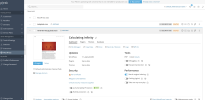
Hi, @Alexander Girod . I am unable to replicate the behavior with a 7.1-alpha-62496 build. It's not the exact same built, but I would assume it should've triggered the error nevetheless:


Screenshot 2026-06-15 185525.png

If the whole WP Toolkit become unresponsive this is something our team would definitely want to look through. Could you please provide more detailed steps to reproduce? As in, did you directly install the alpha build and scanned for the instance through WP Toolkit or did you update an existing instance already present in WP Toolkit? What actions were performed tehreafter? Thanks in advance.
 
Hi, @Alexander Girod . I am unable to replicate the behavior with a 7.1-alpha-62496 build. It's not the exact same built, but I would assume it should've triggered the error nevetheless:


View attachment 29501

If the whole WP Toolkit become unresponsive this is something our team would definitely want to look through. Could you please provide more detailed steps to reproduce? As in, did you directly install the alpha build and scanned for the instance through WP Toolkit or did you update an existing instance already present in WP Toolkit? What actions were performed tehreafter? Thanks in advance.
@Sebahat.hadzhi regarding the beta version you are right, the exact version number isn't important. On my side I hade a different version number before, but I was curious if the beta build at that time was the culprit and clicked on update and got to the version in my screenshot.

The "WordPress Beta" project is an old project, which I'm only opening from time to time and it has been on that server and in the Toolset for years. I think I clicked on "Rescan" to see latest additions and changes of my WordPress websites at some point. When I stumbled upon the issue I didn't actively work with the Toolkit or even on the project. I did other things in Plesk and when I came across the WP Toolkit and wanted to navigate with the pagination to another page, the error occured. The error also gets triggered hwen I try to change the number of items per page.

As far as I remeber WordPress had non-semver version numbers in the past. Which must mean, that either early beta-builds with non-semverversion weren't an issue before or something on Plesk in relation to WordPress has changed.
 
Thank you for the confirmation. It's probably a database inconsistency and the article you linked earlier should help resolve it. Please try following the steps for the website returning the Invalid argument not valid semver error. If that solution doesn't help sorting it out, please double-check /var/log/plesk/panel.log for extension/wp-toolkit related errors.
 
We found a deterministic trigger and the underlying mechanism, so you don't have to keep asking each user to install a beta build on CloudLinux to reproduce it.

This is not about a specific WP build, the OS, or the platform. The WP Toolkit parses version strings with a strict semver parser, and it does not tolerate an empty ('') or a non-semver value. Because the parse error is not caught per record, a single bad record aborts the entire instance list / overview — which is why the whole Toolkit screen dies instead of just showing one problematic row.

There are two reproducible sources:

1. Empty version ('') — any WP component whose metadata carries no version. The most common and, in practice, nearly universal one on our fleet: drop-ins, e.g. wp-content/maintenance.php when maintenance mode is active. By WordPress convention, drop-ins have no Version: header line, so the Toolkit reads '' and the semver parse throws. Maintenance mode is enabled on almost every site at some point, which is why this is so widespread — and why it also matches the original reporter's case (a WP listed before an auto-install finished, or one deleted but not detached; in both cases there is no clean version string).

2. Non-semver values — e.g. a WordPress beta 7.1-alpha-62492, or a 4-segment plugin/theme version like 2014.1231.2016.0 (this matches the report from @Alexander Girod).

Simplest reproduction: put any single WP install into maintenance mode (drop-in present), then open the WP Toolkit overview. That reproduces it without a beta build, without CloudLinux, and without any edge-case host configuration.

I verified on our server (Plesk Obsidian 18.0.82.4, dozens of WP sites) that all WP core versions are valid semver and all theme/plugin versions (authoritative wp-cli output) are valid too — so no site, theme or plugin edit can fix this. The fix has to be on the Toolkit side: tolerate empty/non-semver versions (treat them as unknown, skip them) and catch the parse exception per component instead of letting one bad record fail the whole listing.
 
Back
Top