• We value your experience with Plesk during 2026
    Please help us understand which Plesk features made your work easier this year, what is still missing and how AI should help you in Plesk ?
    Take this short 5-minutes survey. Your answers go straight into the Plesk roadmap for 2027.

Issue Issue with duplicate SSL Certificate

Gerardo Fernandez

New Pleskian
Server operating system version
Plesk Obsidian 18.0.72
Plesk version and microupdate number
Plesk Obsidian 18.0.72 Update 3
I just renewed the Lets Encrypt certificate, however the site shows as No Secure and when I check the certificate on Chrome, Edge or Brave, instead of the Lets Encrypt cert, it shows the default Plesk certificate, its not taking the new Lets Encrypt cert.

I made sure that in the Hosting section the option to Redirect visitors from HTTP to HTTPS via a SEO friendly 301 redirect is enabled, and it points to the Lets Encrypt certificate.

Is there a way to "force" the domain to use a specific certificate?
 
Hello, @Gerardo Fernandez . Could you please try running the following command to repair the SSL configuration of the domain:

Code:
plesk repair web -sslcerts domain.com

Afterward, to make sure you are not seeing cached results, please try testing with another browser or using the incognito/private mode of your current one.

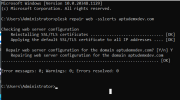
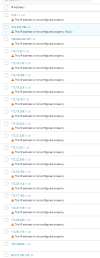
Thank you for the reply, however the website is still showing the Plesk certificate and when running the command, it didn't identify any errors:

1758558360580.png

1758558399475.png
 
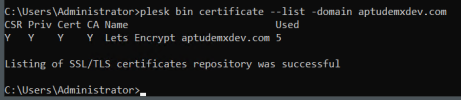
In addition to the suggestion from Sebahat, can you also post back the output of the following command:
Code:
plesk bin certificate --list -domain <your_domain>
 
Back
Top