• Halloween is coming! To celebrate the occasion, we dusted off a couple of old skins, and even created a brand new one (Pixel).
    To get into the festive spirit, install the Skins extension.
  • The new Python extension is now available. It allows customers to deploy and manage WSGI-based Python applications on their websites directly from Plesk.
  • The Plesk Mobile apps for iOS and Android and the Plesk Mobile Center extension have been deprecated, and are no longer available for new installations. In Plesk Obsidian 18.0.84, the Plesk Mobile Center extension will be removed from servers during the upgrade, and the Plesk Mobile apps will lose their server management features.
  • The Social Login extension has been deprecated and will be removed in Plesk Obsidian 18.0.84. After that, it will no longer be possible to log in to Plesk with a Google, Facebook, GitHub account, or with a passkey. Plesk usernames and passwords, as well as logging in with a WebPros Account, are not affected.

Issue Issue with duplicate SSL Certificate

Gerardo Fernandez

New Pleskian
Server operating system version
Plesk Obsidian 18.0.72
Plesk version and microupdate number
Plesk Obsidian 18.0.72 Update 3
I just renewed the Lets Encrypt certificate, however the site shows as No Secure and when I check the certificate on Chrome, Edge or Brave, instead of the Lets Encrypt cert, it shows the default Plesk certificate, its not taking the new Lets Encrypt cert.

I made sure that in the Hosting section the option to Redirect visitors from HTTP to HTTPS via a SEO friendly 301 redirect is enabled, and it points to the Lets Encrypt certificate.

Is there a way to "force" the domain to use a specific certificate?
 
Hello, @Gerardo Fernandez . Could you please try running the following command to repair the SSL configuration of the domain:

Code:
plesk repair web -sslcerts domain.com

Afterward, to make sure you are not seeing cached results, please try testing with another browser or using the incognito/private mode of your current one.
 
Hello, @Gerardo Fernandez . Could you please try running the following command to repair the SSL configuration of the domain:

Code:
plesk repair web -sslcerts domain.com

Afterward, to make sure you are not seeing cached results, please try testing with another browser or using the incognito/private mode of your current one.

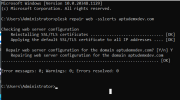
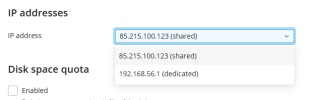
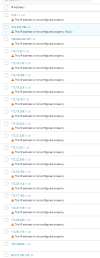
Thank you for the reply, however the website is still showing the Plesk certificate and when running the command, it didn't identify any errors:

1758558360580.png

1758558399475.png
 
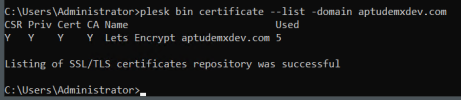
In addition to the suggestion from Sebahat, can you also post back the output of the following command:
Code:
plesk bin certificate --list -domain <your_domain>
 
Back
Top