
 Facebook
 Twitter
Brightside
New Pleskian
Hello.
There are some options in Plesk Onyx which allow to secure panel webui (on port 8443) using letsencrypt certificate
Get certificate for Plesk domain · Issue #11 · plesk/letsencrypt-plesk · GitHub
however seems this feature doesn't work for multiserver (most probably because manager node isn't designed for serving websites). I managed to create subscription with domain panel.xxx.com on service node vh1.xxx.com (where manager node webui url is https://panel.xxx.com:8443 and it's working - DNS A record is ok), but when I'm trying to secure it using letsencrypt I get following:
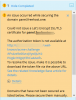

Please help
There are some options in Plesk Onyx which allow to secure panel webui (on port 8443) using letsencrypt certificate
Get certificate for Plesk domain · Issue #11 · plesk/letsencrypt-plesk · GitHub
however seems this feature doesn't work for multiserver (most probably because manager node isn't designed for serving websites). I managed to create subscription with domain panel.xxx.com on service node vh1.xxx.com (where manager node webui url is https://panel.xxx.com:8443 and it's working - DNS A record is ok), but when I'm trying to secure it using letsencrypt I get following:
Please help


