
 Facebook
 Twitter
Username:
TITLE
Log Browser incorrectly dates server restart notification in UI
PRODUCT, VERSION, OPERATING SYSTEM, ARCHITECTURE
Plesk .78
Log Browser: 1.9.18-11077
PROBLEM DESCRIPTION
In contrast to other notifications shown in the notification UI panel which are dated/timed on the actual occurrence of whatever action the notification is about, server restart notifications from the Log Browser are dated/timed to whenever the user opens the notification UI panel. This can be hours, days, weeks from when the actual server restart happend.
The actual date and time when the server restarted is mentioned in message itself. Making it even more confusing the notification date/time is different is different.
Example:
In the screen shot below the server got restarted on 15:54 but the notification is timed at 20:42, the exact moment I opened the notification UI panel.
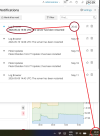
This is a minor issue, but confused me multiple times none the less.
STEPS TO REPRODUCE
1) Restart server (
2) Login to Plesk, wait a few minutes, and open the notification UI panel by clicking the bell icon in the top right corner.
Notice how the time shown in right column for the server restart notification does not match the actual time when the server restarted, by rather is equal to the time you (as a user) opent the notification UI panel.
ACTUAL RESULT
Date/time shown in right column for the server restart notification does not match the actual time when the server restarted.
EXPECTED RESULT
The date/time of the notification matches the actual date/time when the server restarted.
ANY ADDITIONAL INFORMATION
(DID NOT ANSWER QUESTION)
YOUR EXPECTATIONS FROM PLESK SERVICE TEAM
Confirm bug
TITLE
Log Browser incorrectly dates server restart notification in UI
PRODUCT, VERSION, OPERATING SYSTEM, ARCHITECTURE
Plesk .78
Log Browser: 1.9.18-11077
PROBLEM DESCRIPTION
In contrast to other notifications shown in the notification UI panel which are dated/timed on the actual occurrence of whatever action the notification is about, server restart notifications from the Log Browser are dated/timed to whenever the user opens the notification UI panel. This can be hours, days, weeks from when the actual server restart happend.
The actual date and time when the server restarted is mentioned in message itself. Making it even more confusing the notification date/time is different is different.
Example:
In the screen shot below the server got restarted on 15:54 but the notification is timed at 20:42, the exact moment I opened the notification UI panel.
This is a minor issue, but confused me multiple times none the less.
STEPS TO REPRODUCE
1) Restart server (
sudo reboot)2) Login to Plesk, wait a few minutes, and open the notification UI panel by clicking the bell icon in the top right corner.
Notice how the time shown in right column for the server restart notification does not match the actual time when the server restarted, by rather is equal to the time you (as a user) opent the notification UI panel.
ACTUAL RESULT
Date/time shown in right column for the server restart notification does not match the actual time when the server restarted.
EXPECTED RESULT
The date/time of the notification matches the actual date/time when the server restarted.
ANY ADDITIONAL INFORMATION
(DID NOT ANSWER QUESTION)
YOUR EXPECTATIONS FROM PLESK SERVICE TEAM
Confirm bug

