• Halloween is coming! To celebrate the occasion, we dusted off a couple of old skins, and even created a brand new one (Pixel).
    To get into the festive spirit, install the Skins extension.
  • The new Python extension is now available. It allows customers to deploy and manage WSGI-based Python applications on their websites directly from Plesk.
  • The Plesk Mobile apps for iOS and Android and the Plesk Mobile Center extension have been deprecated, and are no longer available for new installations. In Plesk Obsidian 18.0.84, the Plesk Mobile Center extension will be removed from servers during the upgrade, and the Plesk Mobile apps will lose their server management features.
  • The Social Login extension has been deprecated and will be removed in Plesk Obsidian 18.0.84. After that, it will no longer be possible to log in to Plesk with a Google, Facebook, GitHub account, or with a passkey. Plesk usernames and passwords, as well as logging in with a WebPros Account, are not affected.

Resolved Mail on outlooik

kyrill71

New Pleskian
Hello,
I would appreciate if someone can help me to solve the problem I'm using Plesk for my website and e-mail. I would like to use my email on outlook but I get an error message if I try to connect it to my mail. On the webmail, everything works fine but I don't get why it will not work on outlook.

Thanks,

Kyrill
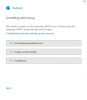
 

Attachments

  • Schermafbeelding 2020-10-01 170656.png
    Schermafbeelding 2020-10-01 170656.png
    15.4 KB · Views: 19
- Try different ports 25 (no encryption), 465 (SSL/TLS) or 587 (STARTTLS).
- Make sure that some of these are open in your firewall. Sometimes a router is blocking these ports or an antivirus software.
- Make sure the ports are open in the firewall of the server, including a firewall that might exist before the server. Some providers block these ports by default so that in your customer login panel at your provider you need to open these first before you can access your server through them.
 
Back
Top