Follow along with the video below to see how to install our site as a web app on your home screen.
Note: This feature may not be available in some browsers.
The APS Catalog has been deprecated and removed from all Plesk Obsidian versions. Applications already installed from the APS Catalog will continue working. However, Plesk will no longer provide support for APS applications.
Please be aware: with the Plesk Obsidian 18.0.78 release, the support for the ngx_pagespeed.so module will be deprecated and removed from the sw-nginx package.
You can try to create file upstream.conf, for example in /etc/nginx/conf.d/ directory with this content. Thins config will be loaded by nginx and will not be affected by any Plesk/nginx update.
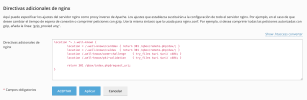
It is global nginx config. In Plesk you can configure nginx config on domain level as "Additional nginx directives" in Web settings of your subscription.
Les dejo mi conf personalizado para nextcloud en plesk.
Lo hice como dice Igor, les dejo la ruta exacta en la GUI.
midominio.com
Haz clic en Hosting y DNS
Haga clic en Configuración de Apache y nginx
Si navega hasta el final de la página, encontrará:
Configuración de Apache y nginx y una caja vacía.
I had forgotten what I used to write here. I have created a new topic. I'm able to run the software by writing directly in nginx.conf.
I wish there was a way to do it within Plesk instead of directly in nginx.