Facebook
 Twitter
I currently run a VPS, which hosts both my website and mailserver requirements; with my opted email client being Outlook.
Recently, I had to rebuild my VPS. As such, I have had to re-create my Email Accounts. Prior to the rebuild, I exported all the emails in Outlook where I have now successfully imported back into Outlook after the rebuild.
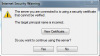
My issue now, is that when I open Outlook, I get an 'Internet Security Warning' message as per my attachment. Why would this be as such a warning message was not appearing prior to the rebuild.
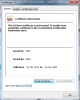
I then selected 'View Certificate' where I can see that the certificate is both issued to and by Plesk. Is this normal and okay? I just don't recall this ever happening previously. I was under the impression that the certificate needed to be issued to the server.
Recently, I had to rebuild my VPS. As such, I have had to re-create my Email Accounts. Prior to the rebuild, I exported all the emails in Outlook where I have now successfully imported back into Outlook after the rebuild.
My issue now, is that when I open Outlook, I get an 'Internet Security Warning' message as per my attachment. Why would this be as such a warning message was not appearing prior to the rebuild.
I then selected 'View Certificate' where I can see that the certificate is both issued to and by Plesk. Is this normal and okay? I just don't recall this ever happening previously. I was under the impression that the certificate needed to be issued to the server.