Follow along with the video below to see how to install our site as a web app on your home screen.
Note: This feature may not be available in some browsers.
The APS Catalog has been deprecated and removed from all Plesk Obsidian versions. Applications already installed from the APS Catalog will continue working. However, Plesk will no longer provide support for APS applications.
Please be aware: with the Plesk Obsidian 18.0.78 release, the support for the ngx_pagespeed.so module will be deprecated and removed from the sw-nginx package.
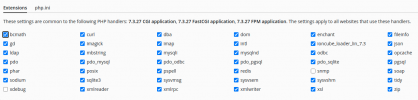
Today I realized that the PHP extensions have disappeared. It should look like this. Looks like something is disabled in my server setting. How can I activate the PHP extensions?
PHP 7.4.4 (cli) (built: Mar 20 2020 15:04:26) ( NTS )
Copyright (c) The PHP Group
Zend Engine v3.4.0, Copyright (c) Zend Technologies
with Zend OPcache v7.4.4, Copyright (c), by Zend Technologies
1 - yum install epel-release
2 - yum install gcc plesk-php74-devel zlib-devel
3 - /opt/plesk/php/7.4/bin/pecl install gmp
Failed
Notice: Trying to access array offset on value of type bool in PEAR/REST.php on line 187
PHP Notice: Trying to access array offset on value of type bool in /opt/plesk/php/7.4/share/pear/PEAR/REST.php on line 187
No releases available for package "pecl.php.net/gmp"
install failed
Same issue with ubuntu instance.
I can see the gmp module through /opt/plesk/php/7.3/bin/php -m
Ran following commands sudo apt install autoconf automake gcc libhashkit-dev pkg-config plesk-php73-dev zlib1g-dev - worked fine
then ran /opt/plesk/php/7.3/bin/pecl install gmp
this gave following error
Code:
No releases available for package "pecl.php.net/gmp"
install failed
If you look at phpinfo() > Configure Command you will see '--with-gmp' there, which means that this is a statically compiled php module. Obviously, such modules can't be managed through Plesk interface because they are always enabled.