• Debian 11 is approaching its end-of-life (vendor EOL date - August 31, 2026). Plesk Obsidian 18.0.80 will be the last release to support it.
    If you are running Plesk Obsidian on Debian 11, we recommend you upgrade those servers to Debian 12 using our dist-upgrade tool.
  • We plan to deprecate and remove the support for XML RPC protocol versions earlier than 1.6.9.1 in Plesk Obsidian 18.0.82. We strongly recommend that you update all existing integrations using earlier versions of the XML RPC protocol to comply with the version 1.6.9.1 specification.

PHP Support 11.5.30 Update #50

szenenight

New Pleskian
Hello, in
Hosting Settings
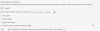
there is no php support - so i can´t change or choose running as apache module or cgi application (s. screenshot), any ideas?


OS Ubuntu 12.04.5 LTS
Panel version 11.5.30 Update #50, last updated at July 17, 2015 03:46 AM
 

Attachments

  • 2015-07-17 14_53_18-SN-Plesk 13.png
    2015-07-17 14_53_18-SN-Plesk 13.png
    16.6 KB · Views: 4
Do you have php as Instaled in Server Components list? Have you checked that php support is enabled in Service Plan? Make sure that permissions in subscription allows you manage php settings.
 
That seems to be the problem:
php The component was not installed

but - why it is not installed? I´ve installed a new php version beside the plesk original one, but didnt deinstall php - what can i do to get the php component back?
 
Hi szenenight,

you always have the choice to install / remove Plesk components over the command line, if you don't find the options over your Plesk Control Panel.

The command:

/usr/local/psa/admin/bin/autoinstaller --select-product-id plesk --select-release-current --show-components --show-options
... will display all available components and its current status.


With the command:

/usr/local/psa/admin/bin/autoinstaller --select-product-id plesk --select-release-current --install-component PLESK_COMPONENT_NAME
you are able to INSTALL components and with the command:

/usr/local/psa/admin/bin/autoinstaller --select-product-id plesk --select-release-current --remove-component PLESK_COMPONENT_NAME
you are able to REMOVE components.


The autoinstaller - script has a lot more options, which you might display with the command:

/usr/local/psa/admin/bin/autoinstaller --help
 
Back
Top