• The new Python extension is now available. It allows customers to deploy and manage WSGI-based Python applications on their websites directly from Plesk.
  • The Plesk Mobile apps for iOS and Android and the Plesk Mobile Center extension have been deprecated, and are no longer available for new installations. In Plesk Obsidian 18.0.84, the Plesk Mobile Center extension will be removed from servers during the upgrade, and the Plesk Mobile apps will lose their server management features.
  • The Social Login extension has been deprecated and will be removed in Plesk Obsidian 18.0.84. After that, it will no longer be possible to log in to Plesk with a Google, Facebook, GitHub account, or with a passkey. Plesk usernames and passwords, as well as logging in with a WebPros Account, are not affected.

PHP Support 11.5.30 Update #50

szenenight

New Pleskian
Hello, in
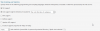
Hosting Settings
there is no php support - so i can´t change or choose running as apache module or cgi application (s. screenshot), any ideas?


OS Ubuntu 12.04.5 LTS
Panel version 11.5.30 Update #50, last updated at July 17, 2015 03:46 AM
 

Attachments

  • 2015-07-17 14_53_18-SN-Plesk 13.png
    2015-07-17 14_53_18-SN-Plesk 13.png
    16.6 KB · Views: 4
Do you have php as Instaled in Server Components list? Have you checked that php support is enabled in Service Plan? Make sure that permissions in subscription allows you manage php settings.
 
That seems to be the problem:
php The component was not installed

but - why it is not installed? I´ve installed a new php version beside the plesk original one, but didnt deinstall php - what can i do to get the php component back?
 
Hi szenenight,

you always have the choice to install / remove Plesk components over the command line, if you don't find the options over your Plesk Control Panel.

The command:

/usr/local/psa/admin/bin/autoinstaller --select-product-id plesk --select-release-current --show-components --show-options
​
... will display all available components and its current status.


With the command:

/usr/local/psa/admin/bin/autoinstaller --select-product-id plesk --select-release-current --install-component PLESK_COMPONENT_NAME
​
you are able to INSTALL components and with the command:

/usr/local/psa/admin/bin/autoinstaller --select-product-id plesk --select-release-current --remove-component PLESK_COMPONENT_NAME
​
you are able to REMOVE components.


The autoinstaller - script has a lot more options, which you might display with the command:

/usr/local/psa/admin/bin/autoinstaller --help​
 
Back
Top