• Debian 11 is approaching its end-of-life (vendor EOL date - August 31, 2026). Plesk Obsidian 18.0.80 will be the last release to support it.
    If you are running Plesk Obsidian on Debian 11, we recommend you upgrade those servers to Debian 12 using our dist-upgrade tool.
  • We plan to deprecate and remove the support for XML RPC protocol versions earlier than 1.6.9.1 in Plesk Obsidian 18.0.82. We strongly recommend that you update all existing integrations using earlier versions of the XML RPC protocol to comply with the version 1.6.9.1 specification.

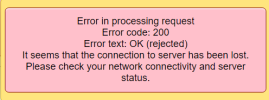
Resolved phpMyAdmin reject 200

Frank.P

Regular Pleskian

I dont know what happend ¿?¿¿?¿??¿​


I can see al tablet, but show rejected error and I cannot see any select sql​


1646834992024.png
 
I found the problem. The new cookie standar with parameter SameSite

I use a rewtite to set this new parameter to None

The cookie phpMyAdmin_https need this in moderm browsers

Now all work
 
I found the problem. The new cookie standar with parameter SameSite

I use a rewtite to set this new parameter to None

The cookie phpMyAdmin_https need this in moderm browsers

Now all work
Thats would be great if you could explain us how you did it ? Facing the same issue ..
Thanks in advance
 
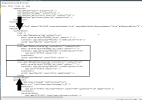
FIRST METHOD:

- Connect to RPD
- Open Notepad
- Open File : C:\Windows\System32\inetsrv\config\applicationHost.config
- Search code "<proxy"
- Bellow paste this code :

<rewrite>
<outboundRules>
<clear />
<rule name="AddSecureCookieFlag" preCondition="" enabled="true">
<match serverVariable="RESPONSE_Set_Cookie" pattern=".*" />
<conditions logicalGrouping="MatchAll" trackAllCaptures="true">
<add input="{HTTPS}" pattern="on" />
</conditions>
<action type="Rewrite" value="{R:0}; secure" />
</rule>
<rule name="AddSameSiteCookieFlag" preCondition="" enabled="true">
<match serverVariable="RESPONSE_Set_Cookie" pattern=".*" />
<conditions logicalGrouping="MatchAll" trackAllCaptures="true">
<add input="{HTTPS}" pattern="on" />
</conditions>
<action type="Rewrite" value="{R:0}; SameSite=None" />
</rule>
</outboundRules>
</rewrite>

1650713936400.png


SECOND METHOD:

- Connect to RPD
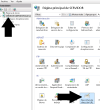
- Open IIS Manager
- Go to Server
- Go to Rewite URL

1650714045249.png

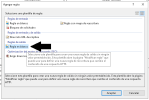
- Click on Add new rule
- Select Blanck Outbound

1650714115707.png

- Variable Name : RESPONSE_Set_Cookie
- Pattern : .*
- Condicion : {HTTPS} and Pattern : on
- Action: Rewrite and Value : {R:0}; secure

1650714285438.png


- Add second Rule
- Variable Name : RESPONSE_Set_Cookie
- Pattern : .*
- Condicion : {HTTPS} and Pattern : on
- Action: Rewrite and Value : {R:0}; SameSite=None


1650714384367.png


When add the 2 rules and go back see this :

1650714498942.png
 

Attachments

  • 1650714475158.png
    1650714475158.png
    7.6 KB · Views: 0
Back
Top