Facebook
 Twitter
bulent
Regular Pleskian
Hi,
new clean Plesk 12.5 install on CentOS 7.1 with MariaDB10 shows some errors when you try to uninstall a plugin using WordPress toolkit.
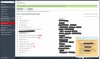
So I have 4 Wodrpess installs, with different plugins, but as you can see in the attachment WooCommerce is installed only in one of the instances, but when you select it and click Uninstall, WP Toolkit returns 3 errors that Woocommerce install is invalid. When you refresh the page, selected plugin is removed.
At the moment it seems like WP Toolkit checks all 4 WP installs and returns error for these three installs where the plugin is not installed.
new clean Plesk 12.5 install on CentOS 7.1 with MariaDB10 shows some errors when you try to uninstall a plugin using WordPress toolkit.
So I have 4 Wodrpess installs, with different plugins, but as you can see in the attachment WooCommerce is installed only in one of the instances, but when you select it and click Uninstall, WP Toolkit returns 3 errors that Woocommerce install is invalid. When you refresh the page, selected plugin is removed.
At the moment it seems like WP Toolkit checks all 4 WP installs and returns error for these three installs where the plugin is not installed.