• We value your experience with Plesk during 2025
    Plesk strives to perform even better in 2026. To help us improve further, please answer a few questions about your experience with Plesk Obsidian 2025.
    Please take this short survey:

    https://survey.webpros.com/

Plesk 8.3 Updater Issues

M

marcelox7

Guest
I got a new vps with Plesk 8.3 already intalled on it. The support guys set up a powerpack, then I when to Updater and I selected the Dr.Web, back up support and etc.
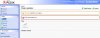
After 25hrs from this Upgrade, In my Plesk Updater Area Still Showing me this message. Any Advice? I don't know what to do...

How Can I Fix It?

Thanks A Lot!
 

Attachments

  • screenshot_03.jpg
    screenshot_03.jpg
    90.7 KB · Views: 161
Hi
Check the autoinstaller's log file /tmp/autoinstaller3.log. The possible errors can give you a hint.
Probably the autoinstaller had just "hanged". Kill the processes named "autoinstaller" from the shell:
ps aux | grep autoinst | awk '{ print $2 }' | xargs kill -9
And check the Plesk updater once again.
 
Thank You So Much!!!

Monica you are my angel...I was having a nightmare with my server and you help me to fix it... Thanks a lot.

Marcelo
 
Monica after I killed the auto installer process I tried to update again, now I got this message.
Any advice?

Thanks a lot!

Marcelo
 

Attachments

  • screenshot_01.jpg
    screenshot_01.jpg
    79.6 KB · Views: 131
The problem appears with Autoinstaller 3.3.0 that was released with the very first build of Plesk 8.3.0 version. Following http://kb.swsoft.com/en/3543 should suffice.
Additionally (and after 3543), you can also run autoinstaller utility with --ignore-key-errors from the shell:
> /usr/local/psa/admin/sbin/autoinstaller --ignore-key-errors
(Allow upgrading product even if upgrade of the license key fails.)
 
Thank you so much. I followed all the directions and the Plesk Updater is working fine now. The only issue I'm having now is with the Dr. Web. Any advice?

I tried to run thru shell using (restart DrWeb from the shell with
/etc/init.d/drwebd start) I got this message:
Key file: /opt/drweb/drweb32.key - Key file not found!
A path to a valid license key file does not specified.
Plesk authorization failed: HTTP request error [6]
Error: Plesk Software not running.
[FAILED]

I followed this directions (http://kb.swsoft.com/en/1658) and my drweb still not working.


Thanks a lot
Marcelo
 

Attachments

  • screenshot_01.jpg
    screenshot_01.jpg
    99.5 KB · Views: 85
Hi there,

I have the same problem. Looking at the logfile, th last (and probably the last 1000 entries) say this:


rpmdb: /var/lib/rpm/Packages: write failed for page 6919
rpmdb: write: 0xab956ca8, 4096: No space lef


Also, checking my system status, it says, my /dev/md6/ is full to a 100%

So, what can I do now? It seems, I can't use ftp now anymore, does not work.

Hanniball
 
Back
Top