Facebook
 Twitter
Hello,
1st of all this is my 1st post and i apologise to be strait to ask a question but i am grateful for any help,
we have a windows plesk server that runs the latest version.
We have a customer that ask us to see if we could install the the ODBC 8.0.20 MySQL :: Download Connector/ODBC as we only had the version 5.3.
We were able to install the refered version after a bug that was corrected via re install the VS++,
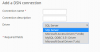
After that we realise that neither version 5.3 nor version 8 are show in Home ==> Tools & Settings ===> ODBC data sources
I just went and have a look control panel programs and functions and we can see that there was ONLY version 8.0 we reinstall the 5.3 as per attach but they dont show on the ODBC data sources.
My question is how can we register the plesk to acknowledged those 2 ie: customers be able to choose from those 2 ?
I try to look into to this with a search on google but i wasn't that successful.
sorry to bother but any shed of help will be grateful.
1st of all this is my 1st post and i apologise to be strait to ask a question but i am grateful for any help,
we have a windows plesk server that runs the latest version.
We have a customer that ask us to see if we could install the the ODBC 8.0.20 MySQL :: Download Connector/ODBC as we only had the version 5.3.
We were able to install the refered version after a bug that was corrected via re install the VS++,
After that we realise that neither version 5.3 nor version 8 are show in Home ==> Tools & Settings ===> ODBC data sources
I just went and have a look control panel programs and functions and we can see that there was ONLY version 8.0 we reinstall the 5.3 as per attach but they dont show on the ODBC data sources.
My question is how can we register the plesk to acknowledged those 2 ie: customers be able to choose from those 2 ?
I try to look into to this with a search on google but i wasn't that successful.
sorry to bother but any shed of help will be grateful.