• We value your experience with Plesk during 2025
    Plesk strives to perform even better in 2026. To help us improve further, please answer a few questions about your experience with Plesk Obsidian 2025.
    Please take this short survey:

    https://survey.webpros.com/
  • On Plesk for Linux mod_status is disabled on upgrades to improve Apache security.
    This is a one-time operation that occurs during an upgrade. You can manually enable mod_status later if needed.

Issue Plesk DNS not responding externally – Registrar says nameserver did not respond (Windows Server)

Fahad009

New Pleskian
Server operating system version
Windows Server 2019 Standard
Plesk version and microupdate number
Version 18.0.74 Update #3
Hello everyone,


I’m running Plesk on Windows Server and using Plesk to manage DNS for my domain.
My domain registrar is WebHostBD, and I have configured my own nameserver:
  • ns1.mydomain.com → 203.76.124.70 (my server public IP)
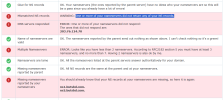
However, when I try to set this at the registrar, I get the error:
“One or more of your nameservers did not respond: 203.76.124.70”
Current setup:
  • OS: Windows Server 2019 Standard
  • Control panel: Plesk Obsidian Web Pro Edition
  • Version 18.0.74 Update #3
  • DNS is managed by Plesk
  • DNS service status: Running
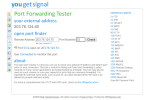
  • Port 53 (TCP/UDP): Open in Windows Firewall
  • Public IP: 203.76.124.70
  • Domain has DNS zone in Plesk with:
    • A record: ns1.mydomain.com → 203.76.124.70
    • NS record: mydomain.com → ns1.mydomain.com
But from outside, queries like:

Code:
nslookup mydomain.com 203.76.124.70
Either timeout or return no response.
My questions:
  1. Does Plesk on Windows require any additional configuration to make DNS authoritative externally?
  2. Is there anything special needed for glue/child nameservers with Plesk?
Any guidance on proper production setup for Plesk DNS on Windows would be appreciated.

Thank you in advance.
 
Here are some photos if it helps
 

Attachments

  • Screenshot 2026-02-05 114312.png
    Screenshot 2026-02-05 114312.png
    159.3 KB · Views: 3
  • Screenshot (4).png
    Screenshot (4).png
    270.3 KB · Views: 3
  • Screenshot 2026-02-05 113816.png
    Screenshot 2026-02-05 113816.png
    43.7 KB · Views: 3
  • Screenshot 2026-02-05 114123.png
    Screenshot 2026-02-05 114123.png
    60.5 KB · Views: 3
I have never heard of WebHostBD so I don't know what the information is consisted of what it offers but you need to set up what is called a glue record. This might be listed in the Private Nameservers or DNS Management. Without that glue record set it will not know how to properly route the request to pull the DNS information.
 
I have never heard of WebHostBD so I don't know what the information is consisted of what it offers but you need to set up what is called a glue record. This might be listed in the Private Nameservers or DNS Management. Without that glue record set it will not know how to properly route the request to pull the DNS information.
Thanks for pointing that out — you’re absolutely right about the glue record.

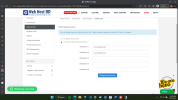
WebHostBD lists this under Child / Private Nameservers, and I have already created the glue record there:
  • ns1.butsbd.com → 203.76.124.70
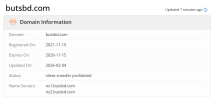
The domain butsbd.com is currently configured to use:
  • ns1.butsbd.com as its nameserver
On the server side:
  • OS: Windows Server
  • Control panel: Plesk
  • DNS is managed by Plesk
  • DNS service is running
  • Port 53 (TCP/UDP) is open
  • DNS zone for butsbd.com exists in Plesk with:
    • A record: ns1.butsbd.com → 203.76.124.70
    • NS record pointing to ns1.butsbd.com
Despite this, external DNS queries to 203.76.124.70 still time out, and the registrar reports that the nameserver does not respond.

At this point, I’m trying to determine whether:
  • there is any additional requirement for Plesk-managed DNS on Windows, or
Thanks again for the clarification on glue records — happy to verify anything else you’d recommend.

Code:
nslookup butsbd.com 203.76.124.70
DNS request timed out.
    timeout was 2 seconds.
Server:  UnKnown
Address:  203.76.124.70

Name:    butsbd.com
Address:  203.76.124.70
 
DNS port s also open

Code:
C:\Users\Administrator>netstat -an | find ":53"
  TCP    0.0.0.0:5357           0.0.0.0:0              LISTENING
  TCP    123.200.15.74:53       0.0.0.0:0              LISTENING
  TCP    127.0.0.1:53           0.0.0.0:0              LISTENING
  TCP    203.76.124.70:53       0.0.0.0:0              LISTENING
  TCP    [::]:5357              [::]:0                 LISTENING
  TCP    [::1]:53               [::]:0                 LISTENING
  TCP    [fe80::8e43:c02e:719a:bda8%12]:53  [::]:0                 LISTENING
  TCP    [fe80::f63a:bdd5:98b3:cd43%5]:53  [::]:0                 LISTENING
  UDP    0.0.0.0:5353           *:*
  UDP    0.0.0.0:5355           *:*
  UDP    123.200.15.74:53       *:*
  UDP    127.0.0.1:53           *:*
  UDP    203.76.124.70:53       *:*
  UDP    [::]:5353              *:*
  UDP    [::]:5355              *:*
  UDP    [::1]:53               *:*
  UDP    [fe80::8e43:c02e:719a:bda8%12]:53  *:*
  UDP    [fe80::f63a:bdd5:98b3:cd43%5]:53  *:*
 
And I'm guessing ns2 is also pointing to the same IP address?

Also the netstat doesn't tell you if ports are open, it only tells you if there's anything listening on the ports, to check if ports are open you would need to check the firewall rules or using a service to test if the port is open. I know at least the TCP part is open, it's hard to test with UDP since UDP does not send a reply back (generally speaking) but from what I can see from my end with my testing it does appear to be open.

So it leads me to what event viewer has to say, and what does the DNS service management looks like, etc.
 
And I'm guessing ns2 is also pointing to the same IP address?

Also the netstat doesn't tell you if ports are open, it only tells you if there's anything listening on the ports, to check if ports are open you would need to check the firewall rules or using a service to test if the port is open. I know at least the TCP part is open, it's hard to test with UDP since UDP does not send a reply back (generally speaking) but from what I can see from my end with my testing it does appear to be open.

So it leads me to what event viewer has to say, and what does the DNS service management looks like, etc.
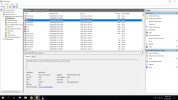
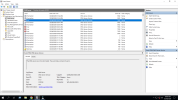
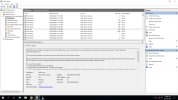
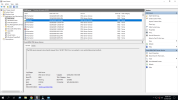
I’ve reviewed the DNS Server logs in Event Viewer and found the following relevant entries:


Event ID 7050 (Error)


“The DNS server recv() function failed.”

These errors appear intermittently and seem to indicate failed receive operations on the DNS socket. This suggests that the DNS service is attempting to receive queries but the connection is being reset or interrupted (possibly external/UDP-related rather than a zone configuration issue).


Event ID 414 (Warning)


The DNS server computer does not have a primary DNS suffix and is using a single-label host name.

This server is not joined to a domain and currently has no primary DNS suffix configured. From my understanding, this warning mainly affects default SOA/NS record generation and referrals, but should not prevent the server from answering authoritative queries for explicitly configured zones.


Event ID 6004 (Warning)


Zone transfer request received for a non-existent or non-authoritative zone (localhost).

This appears to be an external AXFR request and does not seem related to my configured zones. Zone transfers are not enabled, so this warning is expected.


Aside from these, I’m not seeing zone load failures, permission errors, or DNS service startup issues. Zones load successfully and remain present in DNS Manager / Plesk.


Given the recurring 7050 recv() failures, I’m wondering if this points more toward a network-level issue (UDP fragmentation, upstream firewall/ISP handling, or asymmetric filtering) rather than a misconfiguration inside DNS Manager itself.


If there are specific DNS diagnostics or advanced logging options you’d recommend enabling to narrow down the recv() failures, I’m happy to test those.
 

Attachments

  • 203.76.124.70 - Remote Desktop Connection 08-Feb-26 10_06_09 AM.png
    203.76.124.70 - Remote Desktop Connection 08-Feb-26 10_06_09 AM.png
    409.7 KB · Views: 2
  • 203.76.124.70 - Remote Desktop Connection 08-Feb-26 10_06_20 AM.png
    203.76.124.70 - Remote Desktop Connection 08-Feb-26 10_06_20 AM.png
    409.7 KB · Views: 2
  • 203.76.124.70 - Remote Desktop Connection 08-Feb-26 10_07_16 AM.png
    203.76.124.70 - Remote Desktop Connection 08-Feb-26 10_07_16 AM.png
    424 KB · Views: 1
  • 203.76.124.70 - Remote Desktop Connection 08-Feb-26 10_09_32 AM.png
    203.76.124.70 - Remote Desktop Connection 08-Feb-26 10_09_32 AM.png
    381.4 KB · Views: 2
How is your ns2 configured? Is it configured to use the same IP as ns1? And if you check the DNS settings in Microsoft DNS Management does it show the name servers using the ns1 and ns2? Do you have a different server setup for ns2 and if so configured properly for zone transfers?

It's to say without fully looking at the configurations at both the registrar side and on the server itself.

If you want you can always open a ticket directly with Plesk who can directly access your Plesk instance when allowed to assist further. Refer to https://support.plesk.com/hc/en-us/articles/12388090147095-How-to-get-support-directly-from-Plesk for information how.
 
Back
Top