Facebook
 Twitter
brother4
Basic Pleskian
- Server operating system version
- Ubuntu 22.04 x86_64
- Plesk version and microupdate number
- 18.0.53.2
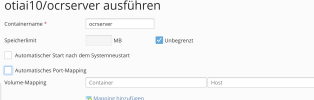
If I remove the checkbox for automatically setting the port, I don't see the fields to enter a port manually like in the video:
. After I removed and reinstalled the extension Plesk was no longer accessible (502 Bad Gateway) in the repair kit it says that the service sw-engine has stopped and can no longer be started...
I've now uninstalled it via shell
and had to restart server.
I've now uninstalled it via shell
sudo plesk bin extension --uninstall dockerand had to restart server.