
 Facebook
 Twitter
- Server operating system version
- Ubuntu 22.04
- Plesk version and microupdate number
- 18.0.49
I try the Plesk Email Security extension. On the dashboard ist states, that there are sent Spam messages.
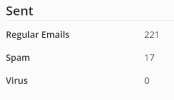
How can I find them (exactly these 17 messages) or at least the log entries for them?
Are these mails sent anyway or blocked? And if sent, are they marked as Spam in the header?
I set to move Spam to Junk folder, but I think it's only for received mails... can we set it for sent emails?
If there is no security issue, maybe mails from my customers were identified as Spam? Or maybe a PHP script - but how do I find it in the Mail logs?
How can I find them (exactly these 17 messages) or at least the log entries for them?
Are these mails sent anyway or blocked? And if sent, are they marked as Spam in the header?
I set to move Spam to Junk folder, but I think it's only for received mails... can we set it for sent emails?
If there is no security issue, maybe mails from my customers were identified as Spam? Or maybe a PHP script - but how do I find it in the Mail logs?
