
 Facebook
 Twitter
Hello, :3
Excuse me, anyone know how I could fix this error trying to migrate plesk from ubuntu server source to plesk on ubuntu server target?
Source Server version: 18.0.33
Target Server version: 18.0.34
I believe the error could be because it's looking for a directory with a double slash in the middle // but I do not know where to fix this.
V here
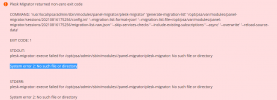
plesk-migrator: execve failed for /opt/psa/admin/sbin/modules//panel-migrator/plesk-migrator: No such file or directory

Excuse me, anyone know how I could fix this error trying to migrate plesk from ubuntu server source to plesk on ubuntu server target?
Source Server version: 18.0.33
Target Server version: 18.0.34
I believe the error could be because it's looking for a directory with a double slash in the middle // but I do not know where to fix this.
V here
plesk-migrator: execve failed for /opt/psa/admin/sbin/modules//panel-migrator/plesk-migrator: No such file or directory



