• The new Python extension is now available. It allows customers to deploy and manage WSGI-based Python applications on their websites directly from Plesk.
  • The Plesk Mobile apps for iOS and Android and the Plesk Mobile Center extension have been deprecated, and are no longer available for new installations. In Plesk Obsidian 18.0.84, the Plesk Mobile Center extension will be removed from servers during the upgrade, and the Plesk Mobile apps will lose their server management features.
  • The Social Login extension has been deprecated and will be removed in Plesk Obsidian 18.0.84. After that, it will no longer be possible to log in to Plesk with a Google, Facebook, GitHub account, or with a passkey. Plesk usernames and passwords, as well as logging in with a WebPros Account, are not affected.

Plesk not working Please Help

M

MarshallR

Guest
I have installed Plesk panel on my windows 2008 Server, I pointed my DNS servers to make ns1.gigigallery.com and ns2.gigigallery.com to my ip, i put them into my DNS on that domain name, but im trying to get it to propagate, its been over 5 days now, I see that ns1.gigigallery.com works and ns2.gigigallery.com works but www.gigigallery.com or any other url does not. Can someone help???
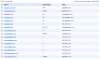
 
This is what i have as my dns records :

attachment.php
 

Attachments

  • dns.png
    dns.png
    32.6 KB · Views: 11
You have local area network IP address specified in DNS, are you trying to resolve this site from computer located in this network? or outside?
 
Back
Top