• Halloween is coming! To celebrate the occasion, we dusted off a couple of old skins, and even created a brand new one (Pixel).
    To get into the festive spirit, install the Skins extension.
  • The new Python extension is now available. It allows customers to deploy and manage WSGI-based Python applications on their websites directly from Plesk.
  • The Plesk Mobile apps for iOS and Android and the Plesk Mobile Center extension have been deprecated, and are no longer available for new installations. In Plesk Obsidian 18.0.84, the Plesk Mobile Center extension will be removed from servers during the upgrade, and the Plesk Mobile apps will lose their server management features.
  • The Social Login extension has been deprecated and will be removed in Plesk Obsidian 18.0.84. After that, it will no longer be possible to log in to Plesk with a Google, Facebook, GitHub account, or with a passkey. Plesk usernames and passwords, as well as logging in with a WebPros Account, are not affected.

Question Plesk on Ubuntu 16.04 (AWS) cannot update PHP 7.4.16 to 7.4.33: how to fix this?

ss4u

New Pleskian
Server operating system version
Ubuntu 16.04.7
Plesk version and microupdate number
Obsidian 18.0.34
Hello,
Our server runs PHP 7.4.16, which is affected by known security vulnerabilities, and we need to apply the security patches. However, PHP 7.4.33 never shows up as an update in Plesk, and I’d like advice on how to solve this.
Environment
  • Cloud: AWS EC2, Europe (Frankfurt)
  • OS: Ubuntu 16.04.7 LTS (end of support)
  • Plesk: Plesk Obsidian, installed in 2021 (version: [Obsidian 18.0.34])
  • PHP: 7.4.16
  • Hosts 4 domains, including a CakePHP application
  • Mail: hosted on this server
Issue
  • The server hosts live client sites, and the PHP version has known vulnerabilities, so we want to update to reduce the risk.
  • Plesk shows no update for PHP 7.4.33. The panel receives no further updates for Ubuntu 16.04, so the PHP package stays at 7.4.16.
  • Both Plesk (2021) and PHP 7.4 are outdated and out of security support.
  • I need a safe way to get to a supported setup with minimal downtime.
Questions
  1. What is the recommended way to get PHP 7.4.33 for these sites when the OS is no longer supported by Plesk?
  2. Is an in-place upgrade of Ubuntu and Plesk realistic from this state, or is there a better approach?
  3. What should I check or back up beforehand to avoid breaking the CakePHP application, mail and SSL certificates?
  4. Anything specific to watch for with CakePHP when changing PHP versions?
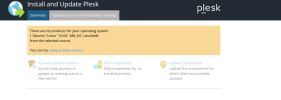
Thank you for your help.
 

Attachments

  • plesk_image.png
    plesk_image.png
    54.4 KB · Views: 1
The OS on your server is severely outdated (!) and as a result hasn't been supported by Plesk for a long time. An in-place upgrade is highly unpractical at this stage, as you have to upgrade to intermitted OS releases. The recommended approach would to spin up a new server with a modern OS and migrate your data, with Plesk Migrator, as suggested by @Martin Dias. The guide Marin linked to should help you prepare.

A word of cation, Plesk generously backported fixes for the recent vulnerabilities (2026-109618 and CVE-2026-109619) to PHP 7.4.33. But has not (and will likely not) fix any other (older or newer) vulnerabilities for the 7.4 branch. It's recommend to upgrade your CakePHP applications too, so they are compatible with newer (still supported) PHP versions.
 
Back
Top