• Debian 11 is approaching its end-of-life (vendor EOL date - August 31, 2026). Plesk Obsidian 18.0.80 will be the last release to support it.
    If you are running Plesk Obsidian on Debian 11, we recommend you upgrade those servers to Debian 12 using our dist-upgrade tool.
  • We plan to deprecate and remove the support for XML RPC protocol versions earlier than 1.6.9.1 in Plesk Obsidian 18.0.82. We strongly recommend that you update all existing integrations using earlier versions of the XML RPC protocol to comply with the version 1.6.9.1 specification.

Issue Plesk startup service not running after installation

gtx98

New Pleskian
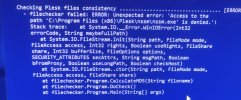
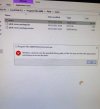
I am facing issue after plesk install on windows server 2019, Plesk startup service not running even after starting many times. While doing plesk repair getting error, attaching screenshot of plesk repair and error at account activation time. There seems to be some issue with plesk-nssm. @IgorG and other experts, kindly help in resolving this issue at the earliest. What needs to be done.IMG-20220327-WA0017.jpgIMG-20220327-WA0016.jpg
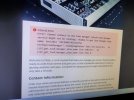
 
@Kuzma Could please help in providing the procedure to install nssm on windows server 2019. When I m installing it gives access denied error. Please share details how to exclude plesk from antivirus/firewall in W. Server 2019 or any security restriction needs to be removed. Plesk startup is not starting because of this.IMG_20220330_142457.jpg
 
Back
Top