• Debian 11 is approaching its end-of-life (vendor EOL date - August 31, 2026). Plesk Obsidian 18.0.80 will be the last release to support it.
    If you are running Plesk Obsidian on Debian 11, we recommend you upgrade those servers to Debian 12 using our dist-upgrade tool.
  • We plan to deprecate and remove the support for XML RPC protocol versions earlier than 1.6.9.1 in Plesk Obsidian 18.0.82. We strongly recommend that you update all existing integrations using earlier versions of the XML RPC protocol to comply with the version 1.6.9.1 specification.

Resolved PleskPMMResponseException - PMMConnector.php 831

Hello Igor,

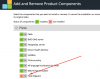
yes it is installed

plesk_migrator.PNG

The creation of backups actually stopped as well... Last Backup made on 2016-11-08
 
Hello. Could you please try to run the following command:
Code:
/usr/local/psa/admin/bin/pmmcli --get-tasks-list Backup
 
Ah, interesting output:

Code:
Traceback (most recent call last):
  File "/opt/psa/admin/sbin/pmmcli", line 5, in <module>
    import pmmcli
  File "/opt/psa/admin/share/pmmcli/pmmcli.py", line 20, in <module>
    import pmmcli_session
  File "/opt/psa/admin/share/pmmcli/pmmcli_session.py", line 15, in <module>
    import pmm_migration_handler
  File "/opt/psa/admin/share/pmmcli/pmm_migration_handler.py", line 14, in <module>
    import migration_handler
  File "/opt/psa/admin/share/migration-handler/migration_handler.py", line 17, in <module>
    from migration_handler_restore import MigrationRestore, MigrationRestoreException
  File "/opt/psa/admin/share/migration-handler/migration_handler_restore.py", line 27, in <module>
    import pmm_repository_access_service
ValueError: bad marshal data (string ref out of range)

ValueError: bad marshal data (string ref out of range)

Seems like a problem with Python, do you know how i can fix it?

Code:
apt-get install --reinstall python2.7
Does not solve it...
 
Could you please try to remove *.pyc and *.pyo files inside plesk directory. They will be re-created automatically.
Code:
# find /usr/local/psa/ -name *.pyc | xargs rm -f
# find /usr/local/psa/ -name *.pyo | xargs rm -f
 
Also you can try to reinstall PMM component with

# plesk installer --select-product-id plesk --select-release-current --remove-component pmm
# plesk installer --select-product-id plesk --select-release-current --install-component pmm
 
Could you please try to remove *.pyc and *.pyo files inside plesk directory. They will be re-created automatically.
Code:
# find /usr/local/psa/ -name *.pyc | xargs rm -f
# find /usr/local/psa/ -name *.pyo | xargs rm -f

Scared me a little bit :) but worked like a charm!

Also you can try to reinstall PMM component with

# plesk installer --select-product-id plesk --select-release-current --remove-component pmm
# plesk installer --select-product-id plesk --select-release-current --install-component pmm

Should have worked as well, but I decided to try Sergey's solution first, because I thought "removing" and "re-installung" could potentially result in an loss of "Backup-Task-Configurations".
With around 40-Domains backingup to an FTP-Repo this would have been a real pain :)


Thank you to both of you! Problem solved!
 
Back
Top