• We value your experience with Plesk during 2025
    Plesk strives to perform even better in 2026. To help us improve further, please answer a few questions about your experience with Plesk Obsidian 2025.
    Please take this short survey:

    https://survey.webpros.com/
  • On Plesk for Linux mod_status is disabled on upgrades to improve Apache security.
    This is a one-time operation that occurs during an upgrade. You can manually enable mod_status later if needed.

Resolved Problem on extension site

KlausZ

Basic Pleskian
Server operating system version
CentOS Linux 7.9.2009 (Core)
Plesk version and microupdate number
Version 18.0.56 Update #2
Hi,

on a centos 7.9 server i see on the extension site an internal server errror:
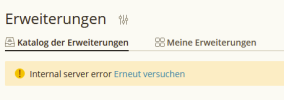
1698585413991.png
The site my extensions and all other works without problems. What can i do?
Thanks, Klaus
 
Hi @KlausZ, you can try these steps to fix it (all with root privileges):

Code:
rm -rf /usr/local/psa/var/cache/https*
plesk db "delete from PersistentCache where events like '%catalog%'"
service sw-engine restart

If that does not help, what is the output of
curl -v https://ext.plesk.com
?
 
Back
Top