Facebook
 Twitter
Thomas Oryon
Regular Pleskian
- Server operating system version
- Redhat linux 9
- Plesk version and microupdate number
- 18.0.76
Hello Plesk Support Team,
We would like to check whether it is possible to hide the PHP-FPM services from the Service Management page in Plesk.
In our environment, we are not using PHP-FPM. We are using LiteSpeed with FastCGI only. The PHP-FPM handlers have already been disabled under the PHP settings, so they are not in use.
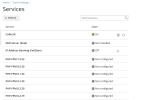
However, under Tools & Settings > Services Management, the PHP-FPM versions are still listed and shown as Not configured, as per the attached screenshot.
Could you please confirm whether these PHP-FPM service entries can be hidden or removed from the Service Management page when they are not being used?
Awaiting your reply.
We would like to check whether it is possible to hide the PHP-FPM services from the Service Management page in Plesk.
In our environment, we are not using PHP-FPM. We are using LiteSpeed with FastCGI only. The PHP-FPM handlers have already been disabled under the PHP settings, so they are not in use.
However, under Tools & Settings > Services Management, the PHP-FPM versions are still listed and shown as Not configured, as per the attached screenshot.
Could you please confirm whether these PHP-FPM service entries can be hidden or removed from the Service Management page when they are not being used?
Awaiting your reply.