• The new Python extension is now available. It allows customers to deploy and manage WSGI-based Python applications on their websites directly from Plesk.
  • The Plesk Mobile apps for iOS and Android and the Plesk Mobile Center extension have been deprecated, and are no longer available for new installations. In Plesk Obsidian 18.0.84, the Plesk Mobile Center extension will be removed from servers during the upgrade, and the Plesk Mobile apps will lose their server management features.
  • The Social Login extension has been deprecated and will be removed in Plesk Obsidian 18.0.84. After that, it will no longer be possible to log in to Plesk with a Google, Facebook, GitHub account, or with a passkey. Plesk usernames and passwords, as well as logging in with a WebPros Account, are not affected.

Issue Remote Storage FTP(S) Issue

Gh()st

New Pleskian
Server operating system version
Ubuntu 22.04.3 LTS
Plesk version and microupdate number
Plesk Obsidian Version 18.0.58
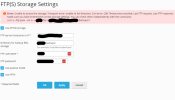
I used to have this set up and working and for reasons that aren't important I disabled it since Oct. 2023. I am trying to set it back up again, using the exact same set up and configuration but now it is giving me issues.
1707873726880.png

When I check the settings as it suggests, I get this:


Code:
PS C:\Users\user> curl -v --ftp-pasv --ssl -k -u userName 'ftp://domain.tld//folderName/backups//'
Warning: --ssl is an insecure option, consider --ssl-reqd instead
Enter host password for user 'userName':
*   Trying IPAddress:21...
* Connected to domain.tld(IPAddress) port 21
< 220 (vsFTPd 3.0.5)
> AUTH SSL
< 530 Please login with USER and PASS.
> AUTH TLS
< 530 Please login with USER and PASS.
> USER userName
< 331 Please specify the password.
> PASS <passwordHere>
< 230 Login successful.
> PWD
< 257 "/" is the current directory
* Entry path is '/'
> CWD /
* ftp_perform ends with SECONDARY: 0
< 250 Directory successfully changed.
> CWD folderName
< 250 Directory successfully changed.
> CWD backups
< 250 Directory successfully changed.
> EPSV
* Connect data stream passively
< 229 Entering Extended Passive Mode (|||38734|)
* Connecting to IPAddress (IPAddress) port 38734
*   Trying IPAddress:38734...
* Connected to domain.tld (IPAddress) port 21
> TYPE A
< 200 Switching to ASCII mode.
> LIST
< 150 Here comes the directory listing.
* Maxdownload = -1
* Remembering we are in dir "/folderName/backups//"
< 226 Directory send OK.
* Connection #0 to host domain.tld left intact

I can also connect using FTP software like WinSCP. So I'm not sure what the issue is or how to fix it. I found somewhere that adding this line to the panel.ini file might help, it did not.


Code:
[pmm]
ftpForbidReuseConnection = 1
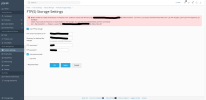
 

Same here:​

Server operating system version: OS Ubuntu 20.04.6 LTS
Plesk version and microupdate number: Plesk Obsidian Version 18.0.60 Update #1

Error-FTP-S-Storage-Settings-Plesk-Obsidian-18-0-60.png

And running the test:

Code:
curl --ftp-create-dirs -v --ftp-pasv -u user 'ftp://example.com/xxx/ftp-inbox/test-dir/'                                                                                 
Enter host password for user 'user':                                                                               
*   Trying 181.47.64.115:21...                                                                                     
* TCP_NODELAY set                                                                                                 
* Connected to example.com (ip-address) port 21 (#0)                                             
< 220 (vsFTPd 3.0.5)                                                                                               
> USER user                                                                                                       
< 331 Please specify the password.                                                                                 
> PASS password                                                                                                   
< 230 Login successful.                                                                                           
> PWD                                                                                                             
< 257 "/home/user" is the current directory                                                                       
* Entry path is '/home/user'                                                                                       
> CWD /                                                                                                           
* ftp_perform ends with SECONDARY: 0                                                                               
< 250 Directory successfully changed.                                                                             
> CWD home                                                                                                         
< 250 Directory successfully changed.                                                                             
> CWD user                                                                                                         
< 250 Directory successfully changed.                                                                             
> CWD ftp-inbox                                                                                                   
< 250 Directory successfully changed.                                                                             
> CWD test-dir                                                                                                     
< 250 Directory successfully changed.                                                                             
> EPSV                                                                                                             
* Connect data stream passively                                                                                   
< 229 Entering Extended Passive Mode (|||59885|)                                                                   
*   Trying 181.47.64.115:59885...                                                                                 
* TCP_NODELAY set                                                                                                 
* Connecting to ip-ftp-server (ip-ftp-server) port 59885                                                           
* Connected to example.com (ip-address) port 21 (#0)                                             
> TYPE A                                                                                                           
< 200 Switching to ASCII mode.                                                                                     
> LIST                                                                                                             
< 150 Here comes the directory listing.                                                                           
* Maxdownload = -1                                                                                                 
* Remembering we are in dir "/home/user/ftp-inbox/test-dir/"                                                       
< 226 Directory send OK.                                                                                           
* Connection #0 to host sinclair.neuroglia.com.ar left intact
 
Back
Top