• The new Python extension is now available. It allows customers to deploy and manage WSGI-based Python applications on their websites directly from Plesk.
  • The Plesk Mobile apps for iOS and Android and the Plesk Mobile Center extension have been deprecated, and are no longer available for new installations. In Plesk Obsidian 18.0.84, the Plesk Mobile Center extension will be removed from servers during the upgrade, and the Plesk Mobile apps will lose their server management features.
  • The Social Login extension has been deprecated and will be removed in Plesk Obsidian 18.0.84. After that, it will no longer be possible to log in to Plesk with a Google, Facebook, GitHub account, or with a passkey. Plesk usernames and passwords, as well as logging in with a WebPros Account, are not affected.

Question Remove Backup-Job for empty Customer

SiegbertG

Basic Pleskian
Server operating system version
Ubuntu 16.4
Plesk version and microupdate number
Plesk Obsidian v18.0.34_build1800210325.10 os_Ubuntu 16.04
Hi,

I had removed all sites of a customer because they are transferred to an other server. But I forgot to disable a backup-task for this customer. Now this backup can't be edited or removed. It is invisible in Plesk.
I see only the fulfilled backups but can not see any link to open the backup-task gor editing or to delete it.
How can this 'ghost' be deleted?
I don't delete the customer. Maybe it is necessary to have a chance to delete the backup-task? Or must it be deleted to remove the backup-task?

Siegbert
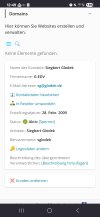
 
Login to the customers account, navigate to the customer "account" settings (on the left side menu). You should be able to manage to backups form there.
 
I tried that before creating the thread. In the customer settings is no link to the backup-manager. I can see only a "there are no sites" text.
I have only a screenshot in German:
1000046200.jpg
 
You're right. This looks like a bug to me. There should at least be an option to still manage the active scheduled backup. I've crated a bug report for this on your behalf.

There a two possible workarounds I can think of to deactivate the scheduled backup.

A) Connect to the server via SSH and run the command below (replace the <customer login name> placeholder with the customer login name (sglodek).
Code:
plesk bin scheduled-backup --list -customer <customer login name>
This will list the details of the active backup, including the period on which the backup runs (daily, weekly, montly, ect).

Code:
active  period  schedule             last_run                            storage       incremental  full_backup  retention
true      daily     08:30                  2025-06-16 08:39:16   server         true                 weekly          4

To disable the backup run the command bellow. Replace the <period> placeholder with the schedule period (for example daily) and the the <customer login name> placeholder with the customer login name.
Code:
plesk bin scheduled-backup --disable <period> -customer <customer login name>

Or B), alternatively you can add a random domain name to the account to be able to access the scheduled account backup page again. (Doesn't need to be an existing domain name, something like adafasffdasd.de works fine). And remove the domain again afterwards.
 
Back
Top