Facebook
 Twitter
- Server operating system version
- Ubuntu 26.04.1 LTS
- Plesk version and microupdate number
- Plesk Obsidian v18.0.82_build1800261023.10 os_Ubuntu 26.04
There are multiple warnings while updating ubuntu and plesk. can u check into this?
Code:
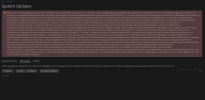
Error: Unable to get packages list: 2026-10-27 21:49:40 INFO: pum is called with arguments: ['--list', '--repo-info', '--json'] /usr/lib/python3/dist-packages/apt/cache.py:565: Warning: W:An error occurred during the signature verification. The repository is not updated and the previous index files will be used. OpenPGP signature verification failed: http://autoinstall.plesk.com/WATCHDOG_3.1.0 resolute InRelease: The following signatures couldn't be verified because the public key is not available: NO_PUBKEY E9299045CE550E57, W:Target Packages (all/binary-amd64/Packages) is configured multiple times in /etc/apt/sources.list.d/plesk.list:3 and /etc/apt/sources.list.d/plesk.sources:2, W:Target Packages (all/binary-all/Packages) is configured multiple times in /etc/apt/sources.list.d/plesk.list:3 and /etc/apt/sources.list.d/plesk.sources:2, W:Target Translations (all/i18n/Translation-en) is configured multiple times in /etc/apt/sources.list.d/plesk.list:3 and /etc/apt/sources.list.d/plesk.sources:2, W:Target DEP-11 (all/dep11/Components-amd64.yml) is configured multiple times in /etc/apt/sources.list.d/plesk.list:3 and /etc/apt/sources.list.d/plesk.sources:2, W:Target DEP-11 (all/dep11/Components-all.yml) is configured multiple times in /etc/apt/sources.list.d/plesk.list:3 and /etc/apt/sources.list.d/plesk.sources:2, W:Target Packages (all/binary-amd64/Packages) is configured multiple times in /etc/apt/sources.list.d/plesk.list:4 and /etc/apt/sources.list.d/plesk.sources:3, W:Target Packages (all/binary-all/Packages) is configured multiple times in /etc/apt/sources.list.d/plesk.list:4 and /etc/apt/sources.list.d/plesk.sources:3, W:Target Translations (all/i18n/Translation-en) is configured multiple times in /etc/apt/sources.list.d/plesk.list:4 and /etc/apt/sources.list.d/plesk.sources:3, W:Target DEP-11 (all/dep11/Components-amd64.yml) is configured multiple times in /etc/apt/sources.list.d/plesk.list:4 and /etc/apt/sources.list.d/plesk.sources:3, W:Target DEP-11 (all/dep11/Components-all.yml) is configured multiple times in /etc/apt/sources.list.d/plesk.list:4 and /etc/apt/sources.list.d/plesk.sources:3, W:Target Packages (all/binary-amd64/Packages) is configured multiple times in /etc/apt/sources.list.d/plesk.list:5 and /etc/apt/sources.list.d/plesk.sources:4, W:Target Packages (all/binary-all/Packages) is configured multiple times in /etc/apt/sources.list.d/plesk.list:5 and /etc/apt/sources.list.d/plesk.sources:4, W:Target Translations (all/i18n/Translation-en) is configured multiple times in /etc/apt/sources.list.d/plesk.list:5 and /etc/apt/sources.list.d/plesk.sources:4, W:Target DEP-11 (all/dep11/Components-amd64.yml) is configured multiple times in /etc/apt/sources.list.d/plesk.list:5 and /etc/apt/sources.list.d/plesk.sources:4, W:Target DEP-11 (all/dep11/Components-all.yml) is configured multiple times in /etc/apt/sources.list.d/plesk.list:5 and /etc/apt/sources.list.d/plesk.sources:4, W:An error occurred during the signature verification. The repository is not updated and the previous index files will be used. OpenPGP signature verification failed: http://autoinstall.plesk.com/pool/PSA_18.0.81_19954 resolute InRelease: The following signatures couldn't be verified because the public key is not available: NO_PUBKEY E9299045CE550E57, W:Failed to fetch http://autoinstall.plesk.com/WATCHDOG_3.1.0/dists/resolute/InRelease The following signatures couldn't be verified because the public key is not available: NO_PUBKEY E9299045CE550E57, W:Failed to fetch http://autoinstall.plesk.com/pool/PSA_18.0.81_19954/dists/resolute/InRelease The following signatures couldn't be verified because the public key is not available: NO_PUBKEY E9299045CE550E57, W:Some index files failed to download. They have been ignored, or old ones used instead. res = self._cache.update(fetch_progress, slist, pulse_interval) 2026-10-27 21:49:42 ERROR: Apt cache fetch failed. Try to run the `apt-get update` command. 2026-10-27 21:49:42 ERROR: 2026-10-27 21:49:42 ERROR: Exited with returncode 1.