Follow along with the video below to see how to install our site as a web app on your home screen.
Note: This feature may not be available in some browsers.
The APS Catalog has been deprecated and removed from all Plesk Obsidian versions. Applications already installed from the APS Catalog will continue working. However, Plesk will no longer provide support for APS applications.
Please be aware: with the Plesk Obsidian 18.0.78 release, the support for the ngx_pagespeed.so module will be deprecated and removed from the sw-nginx package.
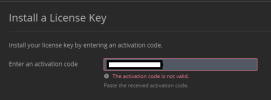
License key and activation code are two different things. I think you got a license key but no activation code. An activation code is an alphanumeric sequence consisting of five groups of six characters each, like this one: AB1C23-4DEF56-7GHI89-JK1L23-MNP456. A license key is an .xml or .zip file.
Please first check on Tools & Settings > Plesk > License Information > Additional License Keys if your add-on license is not already listed there.
If it is not already shown there and you have no activation code, but instead a license key file in .xml or .zip format, then please enable uploading license files by adding this section to your panel.ini file (normally located in /usr/local/psa/admin/conf/panel.ini):
Code:
[license]
fileUpload = on
Afterwards you will be able to upload your license key file to install the license.