
 Facebook
 Twitter
Hi friends:
I've a server with several accounts that contains websites managed with Plesk Panel. One of them, only one, shows exceeded the disk space quota. This isn't a big website, no big files, no big mail messages, none database... but the statics show space unllocated. I'd thought in the logs, but I'd downloaded the /www folder and 'd checked the size, 35 Mb. So I think the "busy space" must be in another part, but referred to this website.
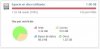
I attach an image from statics plesk panel for this site, here shows "otros" 1,02 Gb. Someboy know where is this space?
Thanks and best regards !!
I've a server with several accounts that contains websites managed with Plesk Panel. One of them, only one, shows exceeded the disk space quota. This isn't a big website, no big files, no big mail messages, none database... but the statics show space unllocated. I'd thought in the logs, but I'd downloaded the /www folder and 'd checked the size, 35 Mb. So I think the "busy space" must be in another part, but referred to this website.
I attach an image from statics plesk panel for this site, here shows "otros" 1,02 Gb. Someboy know where is this space?
Thanks and best regards !!
