• Halloween is coming! To celebrate the occasion, we dusted off a couple of old skins, and even created a brand new one (Pixel).
    To get into the festive spirit, install the Skins extension.
  • The new Python extension is now available. It allows customers to deploy and manage WSGI-based Python applications on their websites directly from Plesk.
  • The Plesk Mobile apps for iOS and Android and the Plesk Mobile Center extension have been deprecated, and are no longer available for new installations. In Plesk Obsidian 18.0.84, the Plesk Mobile Center extension will be removed from servers during the upgrade, and the Plesk Mobile apps will lose their server management features.
  • The Social Login extension has been deprecated and will be removed in Plesk Obsidian 18.0.84. After that, it will no longer be possible to log in to Plesk with a Google, Facebook, GitHub account, or with a passkey. Plesk usernames and passwords, as well as logging in with a WebPros Account, are not affected.

Resolved The SSL It! Mozilla cypher settings are missing.

BiGG33

New Pleskian
Server operating system version
Ubuntu 22.04.5 LTS
Plesk version and microupdate number
Plesk Obsidian 18.0.64 Update #1
Hello everyone,

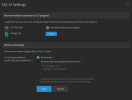
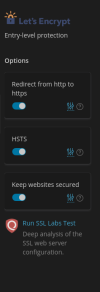
I need to adjust my Severs or Domains TLS cypher settings but the panel to adjust those is missing all of a sudden. Please see the pictures attached. I looked through all the documentation and searched the forum and there is no mention of this option having been removed at all. Am I missing something?
 

Attachments

  • Screenshots1.png
    Screenshots1.png
    27.8 KB · Views: 17
  • Screenshots2.png
    Screenshots2.png
    61.7 KB · Views: 17
Hello, @BiGG33. As of SSL It! 1.15.5, this function is hidden. If you would like to restore this functionality, you can add the following lines to the panel.ini file:

[ext-sslit]
ciphersEnabled = true

Please note that this may cause issues with certain outdated ciphers, so it is recommended to proceed with caution.
 
Back
Top