
 Facebook
 Twitter
PeopleInside
Regular Pleskian
- Server operating system version
- Ubuntu 22.04.3 LTS
- Plesk version and microupdate number
- 18.0.58 Update #2
I have different email account.
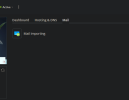
Today I access Plesk for add a new email and Plesk is not showing the button to access to email account.
I do on domains, i select the domain, I open the mail tab and I don't find a button to open my email account page.
How can I manage my email address?
I need create a new email!
Thanks.
Seems a Plesk bug but I really need manage my email account. And now?
Today I access Plesk for add a new email and Plesk is not showing the button to access to email account.
I do on domains, i select the domain, I open the mail tab and I don't find a button to open my email account page.
How can I manage my email address?
I need create a new email!
Thanks.
Seems a Plesk bug but I really need manage my email account. And now?

