Facebook
 Twitter
- Server operating system version
- Debian 10
- Plesk version and microupdate number
- 18.0.57
Hi everyone,
I have a small problem, I can't understand if it's caused by Plesk or by the VPS.
Basically we upgraded the VPS from the ovh provider, doubling everything, core, ram and storage.
At the start I had 2 cores, 4GB of RAM and 80GB of storage, now I have everything doubled, therefore, 4 cores, 8GB of RAM and 160GB of storage.
After updating, ovh tells me that I have to allocate the partition myself.
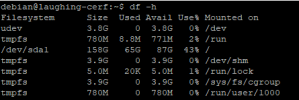
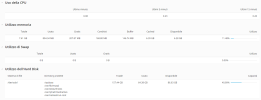
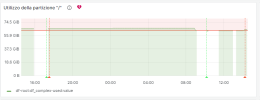
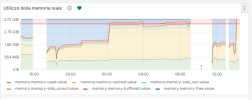
By launching the command that tells me ovh, I already see all 160GB of the partition. Despite this, on Plesk it continues to see 80GB, furthermore, again on Plesk, in the monitoring I see 4GB of RAM, while in the server information I see 8GB.
Is there something I need to do? I attach the screenshots.
I have a small problem, I can't understand if it's caused by Plesk or by the VPS.
Basically we upgraded the VPS from the ovh provider, doubling everything, core, ram and storage.
At the start I had 2 cores, 4GB of RAM and 80GB of storage, now I have everything doubled, therefore, 4 cores, 8GB of RAM and 160GB of storage.
After updating, ovh tells me that I have to allocate the partition myself.
By launching the command that tells me ovh, I already see all 160GB of the partition. Despite this, on Plesk it continues to see 80GB, furthermore, again on Plesk, in the monitoring I see 4GB of RAM, while in the server information I see 8GB.
Is there something I need to do? I attach the screenshots.