Follow along with the video below to see how to install our site as a web app on your home screen.
Note: This feature may not be available in some browsers.
The APS Catalog has been deprecated and removed from all Plesk Obsidian versions. Applications already installed from the APS Catalog will continue working. However, Plesk will no longer provide support for APS applications.
Please be aware: with the Plesk Obsidian 18.0.78 release, the support for the ngx_pagespeed.so module will be deprecated and removed from the sw-nginx package.
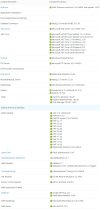
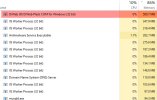
I found out that Dr Web Plesk uses a significant amount of memory. If I am not mistaken this is an antivirus for mail, isn't it ? Well as I am not using email services on my server how can I disable this ? I have attached to this post all services I have and don't see that one.
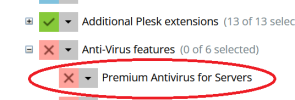
Dr.web (called Plesk Premium Anti-virus) can be uninstalled via Tools & Settings > Updates. Which opens a new tab/window on which you can click the "Add/Remove Components" and de-select the Premium antivirus for servers option.