
 Facebook
 Twitter
Hello,
I was wondering why there are no updates available for days, when I looked in the Update-Manager of Plesk I found the following error:
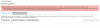
Nothing has been changed on the system, how can i fix this?
Thank you in advance.
I was wondering why there are no updates available for days, when I looked in the Update-Manager of Plesk I found the following error:
Fehler: Paketliste konnte nicht abgerufen werden: 2019-04-12 06:46:23 INFO: pum is called with arguments: ['--list', '--repo-info', '--json'] 2019-04-12 06:46:30 ERROR: W:Failed to fetch http://http.debian.net/debian/dists/jessie-updates/InRelease Unable to find expected entry 'main/binary-amd64/Packages' in Release file (Wrong sources.list entry or malformed file) , E:Some index files failed to download. They have been ignored, or old ones used instead. 2019-04-12 06:46:30 ERROR: Exited with returncode 1.
Version Plesk Onyx v17.8.11_build1708180301.19 os_Debian 8.0
OS Debian 8.11
Nothing has been changed on the system, how can i fix this?
Thank you in advance.


