
 Facebook
 Twitter

Kit
New Pleskian
- Server operating system version
- Ubuntu 24.04.5 LTS
- Plesk version and microupdate number
- Plesk Obsidian 18.0.76 Update 6 Web Pro Edition
Yes i did a search first but obviously no one had the exact same issue or i missed it.
This is the output i see when trying to upgrade:
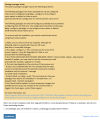
Trying to follow the steps leads nowhere.
Step 2 ends up in:
dpkg: Fehler beim Bearbeiten des Paketes plesk-dns-bind-driver (--configure):
Abhängigkeitsprobleme - verbleibt unkonfiguriert
Fehler traten auf beim Bearbeiten von:
bind9
plesk-dns-bind-driver
Step 3 quits with:
you already have the latest
version of product(s) and all the selected components installed.
Installation will not continue
Step 4a "plesk repair installation" quits with:
It runs fine until this point->
Fixing permissions on Panel packages files
The file '/var/parallels/autoinstaller-installation-failure.flag' is present, which may indicate problems with recent update.
Please check '/var/log/plesk/install/plesk_18.0.76_repair.log' for details
Bootstrapper repair finished.
If problems persist, please check installer logs ('/var/log/plesk/install/plesk_18.0.76_repair.log' and '/var/log/plesk/install/plesk_18.0.76_repair_problems.log') for errors.
If you can't resolve the issue on your own, please address Plesk support.
Step 4b "dpkg --audit" quits with:
Die folgenden Pakete wurden entpackt, aber noch nicht konfiguriert.
Sie müssen mit dpkg --configure oder dem Konfigurations-Menüeintrag in
dselect konfiguriert werden, damit sie ordnungsgemäß funktionieren:
plesk-dns-bind-driver Configurator for Internet domain name server
Die folgenden Pakete sind nur halb konfiguriert, wahrscheinlich durch
Probleme während der ersten Konfiguration. Die Konfiguration sollte mit
dpkg --configure <Paket> oder mit dem Konfigurations-Menüeintrag in
dselect erneut versucht werden:
bind9 Internet Domain Name Server
Step 4c "apt-get install --reinstall bind9"
Paketlisten werden gelesen… Fertig
Abhängigkeitsbaum wird aufgebaut… Fertig
Statusinformationen werden eingelesen… Fertig
0 aktualisiert, 0 neu installiert, 1 erneut installiert, 0 zu entfernen und 11 nicht aktualisiert.
2 nicht vollständig installiert oder entfernt.
Nach dieser Operation werden 0 B Plattenplatz zusätzlich benutzt.
E: Internal Error, No file name for bind9:amd64
Step 4d "sudo dpkg-reconfigure bind9":
/usr/sbin/dpkg-reconfigure: bind9 ist kaputt oder nicht komplett installiert
Sorry for german but i use Terminal on my MAC with german language...
However it seems i'm chasing my tail here and need urgent help.
Hope someone knows what to do to resolve...
This is the output i see when trying to upgrade:
Trying to follow the steps leads nowhere.
Step 2 ends up in:
dpkg: Fehler beim Bearbeiten des Paketes plesk-dns-bind-driver (--configure):
Abhängigkeitsprobleme - verbleibt unkonfiguriert
Fehler traten auf beim Bearbeiten von:
bind9
plesk-dns-bind-driver
Step 3 quits with:
you already have the latest
version of product(s) and all the selected components installed.
Installation will not continue
Step 4a "plesk repair installation" quits with:
It runs fine until this point->
Fixing permissions on Panel packages files
The file '/var/parallels/autoinstaller-installation-failure.flag' is present, which may indicate problems with recent update.
Please check '/var/log/plesk/install/plesk_18.0.76_repair.log' for details
Bootstrapper repair finished.
If problems persist, please check installer logs ('/var/log/plesk/install/plesk_18.0.76_repair.log' and '/var/log/plesk/install/plesk_18.0.76_repair_problems.log') for errors.
If you can't resolve the issue on your own, please address Plesk support.
Step 4b "dpkg --audit" quits with:
Die folgenden Pakete wurden entpackt, aber noch nicht konfiguriert.
Sie müssen mit dpkg --configure oder dem Konfigurations-Menüeintrag in
dselect konfiguriert werden, damit sie ordnungsgemäß funktionieren:
plesk-dns-bind-driver Configurator for Internet domain name server
Die folgenden Pakete sind nur halb konfiguriert, wahrscheinlich durch
Probleme während der ersten Konfiguration. Die Konfiguration sollte mit
dpkg --configure <Paket> oder mit dem Konfigurations-Menüeintrag in
dselect erneut versucht werden:
bind9 Internet Domain Name Server
Step 4c "apt-get install --reinstall bind9"
Paketlisten werden gelesen… Fertig
Abhängigkeitsbaum wird aufgebaut… Fertig
Statusinformationen werden eingelesen… Fertig
0 aktualisiert, 0 neu installiert, 1 erneut installiert, 0 zu entfernen und 11 nicht aktualisiert.
2 nicht vollständig installiert oder entfernt.
Nach dieser Operation werden 0 B Plattenplatz zusätzlich benutzt.
E: Internal Error, No file name for bind9:amd64
Step 4d "sudo dpkg-reconfigure bind9":
/usr/sbin/dpkg-reconfigure: bind9 ist kaputt oder nicht komplett installiert
Sorry for german but i use Terminal on my MAC with german language...
However it seems i'm chasing my tail here and need urgent help.
Hope someone knows what to do to resolve...


