• Inviting everyone who uses WordPress management tools in Plesk
    The Plesk team is conducting a 60-minute research session that includes an interview and a moderated usability test.
    To participate, please use this link .
    Your experience will help shape product decisions and ensure the tools better support real-world use cases.

Question User menu missing

Vikelidis Kostas

New Pleskian
Hello,

I have two accounts in two different Plesk Server. In one of them the "Users" menu is missing.

Compare the following screenshots and you will see what i mean.

"Users" menu is missing:
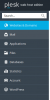
plesk_without_menu.png

"Users" menu is present:
Plesk_with_menu.png

Is there any option to enable this menu item?

I have admin access in both servers.

Thanks.
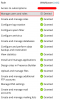
 
Maybe it's something with the User's permissions?
When the User you created does not have the "Manage users and roles" granted, he will not be able to see the "Users" menu when he logs in
 

Attachments

  • permissions.png
    permissions.png
    77.8 KB · Views: 20
Hi Vikelidis,
My apologies for the delay.

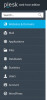
Using your Plesk admin account, just log in -> Hosting Services -> Subscriptions -> example.com
upload_2019-10-7_9-44-47.png

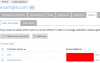
Select the Users option.
There, you will be able to manage the accounts you have
upload_2019-10-7_9-47-11.png

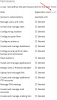
And if you select a user, you will be able to modify his permissions.
upload_2019-10-7_9-48-49.png
Hope this helps!
 
Back
Top