• Debian 11 is approaching its end-of-life (vendor EOL date - August 31, 2026). Plesk Obsidian 18.0.80 will be the last release to support it.
    If you are running Plesk Obsidian on Debian 11, we recommend you upgrade those servers to Debian 12 using our dist-upgrade tool.
  • We plan to deprecate and remove the support for XML RPC protocol versions earlier than 1.6.9.1 in Plesk Obsidian 18.0.82. We strongly recommend that you update all existing integrations using earlier versions of the XML RPC protocol to comply with the version 1.6.9.1 specification.

Issue User role no longer able to change password

William Fong

New Pleskian
Server operating system version
AlmaLinux 8.10
Plesk version and microupdate number
Plesk Obsidian 18.0.80 #5
Dear Sir,

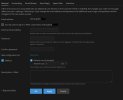
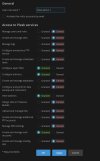
Just discover that under User Role, "Create and manage mail accounts" granted rights, it is no longer able to change user's password for existing users. That password portion has been grey off. We used to be able to do that in the past.

Could we have that feature back?

Thanks
 

Attachments

  • Screenshot 2026-08-28 122505.jpg
    Screenshot 2026-08-28 122505.jpg
    169.3 KB · Views: 9
Hi, @William Fong . I am afraid, I was unable to clearly understand the issue. Sorry. What password exactly are you looking forward to changing - the email account, the password of the user itself, or another one?

I configured a user role matching the permissions from the screenshot and I am able to change the email account permissions as well as adjust the password of the user. I would appreciate some further clarification.
 
Hi, @William Fong . I am afraid, I was unable to clearly understand the issue. Sorry. What password exactly are you looking forward to changing - the email account, the password of the user itself, or another one?

I configured a user role matching the permissions from the screenshot and I am able to change the email account permissions as well as adjust the password of the user. I would appreciate some further clarification.
Hi Sebahat, thank you for helping me out. Yes you got me right, I'm able to change to password for the same user that was logged in, but not for other users within the same domain. The password portion of the other users would be grey out.

Used to be able to do that in the past so that a user with the "Create and manage mail accounts" enabled role would help other users reset their passwords.
 

Attachments

  • Screenshot 2026-08-29 101346.jpg
    Screenshot 2026-08-29 101346.jpg
    155.5 KB · Views: 1
Back
Top